Frymaster L.L.C., 8700 Line Avenue 71106, P.O. Box 51000, Shreveport, Louisiana 71135-1000
318-865-1711 FAX 318-862-2394
Printed in the United States Service Hotline
Page
8
1-800-24-FRYER
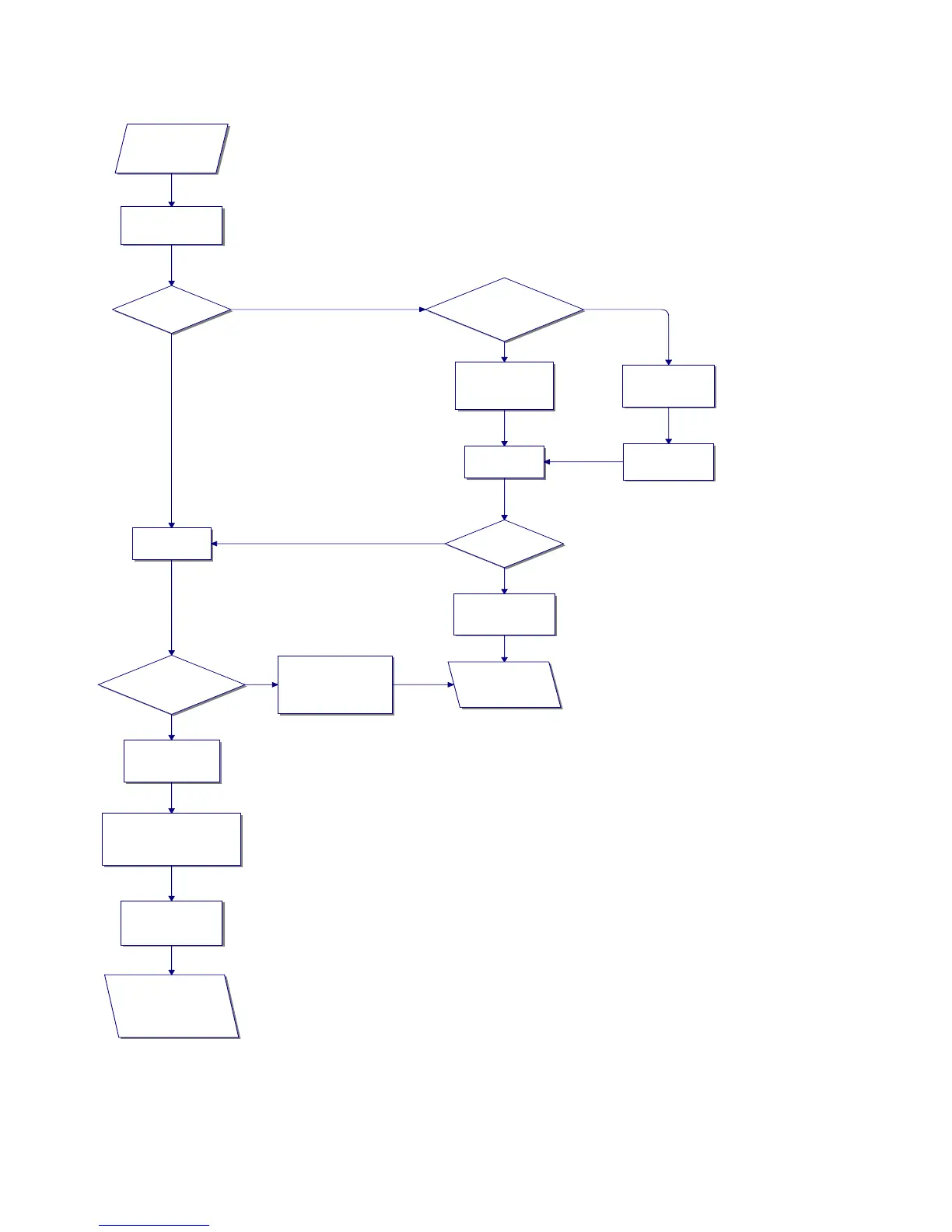
8. HLZ Series Operator Troubleshooting
The HLZ does not
function properly.
Press the ON/OFF
switch.
Does the
computer power
up?
Computer is
functioning.
Does air blow
out of the cowl
assembly?
The blower is
operational.
Run the unit for 20 minutes
before continuing with
troubleshooting.
Observe the
computer display.
Go to next page and
continue at the top of
the flow chart.
The blower, latching
relay, or solid state
relays need service.
Is the power cord
plugged into the proper
voltage outlet?
Check wall circuit
breaker to see if it
has tripped.
If circuit breaker
has tripped, reset
the breaker.
Plug power cord
into proper outlet.
Press ON/OFF
switch once.
Does the
computer come
on?
Low voltage
transformer, fuse, or
computer is faulty.
Call your authorized
Frymaster servicer.
Yes
No
Yes
No
Yes
No
Yes
No



 To Next Page