3. INSTALLATION
27
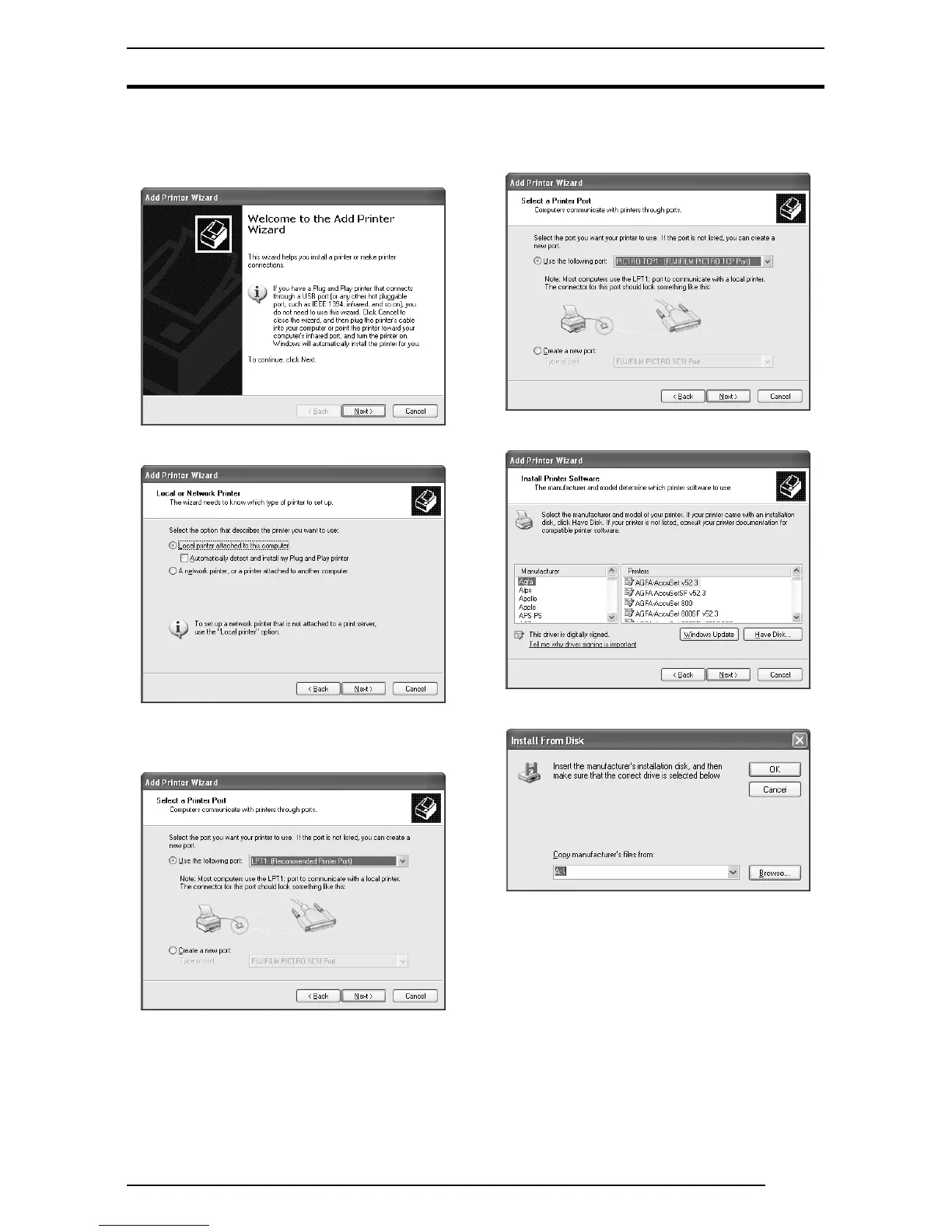
12. Now install the printer.
Click the [Add a printer] icon in the [Printers and Faxes] folder
window.
The [Add Printer Wizard] dialog box is displayed.
13. Click the [Next] button.
The following appears.
14. Select [Local printer attached to this computer] and uncheck
[Automatically detect and install my Plug and Play printer].
Click the [Next] button.
The following appears.
15. Select [Use the following port], and then click to select [PICTRO
TCPx:] (x: numerical value entered as the port name) from the
list of ports.
16. Click the [Next] button.
The following appears.
17. Click the [Have Disk] button.
The [Install From Disk] dialog box is displayed.
Enter the following location in the [Copy manufacturer’s files
from] field.
For the CE type, enter:
E:\Driver\PG3500\Win2k_XP\English\CE (for 3500)
E:\Driver\PG4K2_4500\Win2k_XP\English\CE (for 4000
2/
4500)
(* if your CD-ROM drive is E: drive)
For the UC type, enter:
E:\Driver\PG3500\Win2k_XP\English\UC (for 3500)
E:\Driver\PG4K2_4500\Win2k_XP\English\UC (for 4000
2/
4500)
(* if your CD-ROM drive is E: drive)




 To Next Page