3. How to install printer driver
* Using Windows Vista
(1) Log-in as Administrator or with the authority of Administrator.
(2) When Printer is connected, play and plug will start and will request Printer Driver.
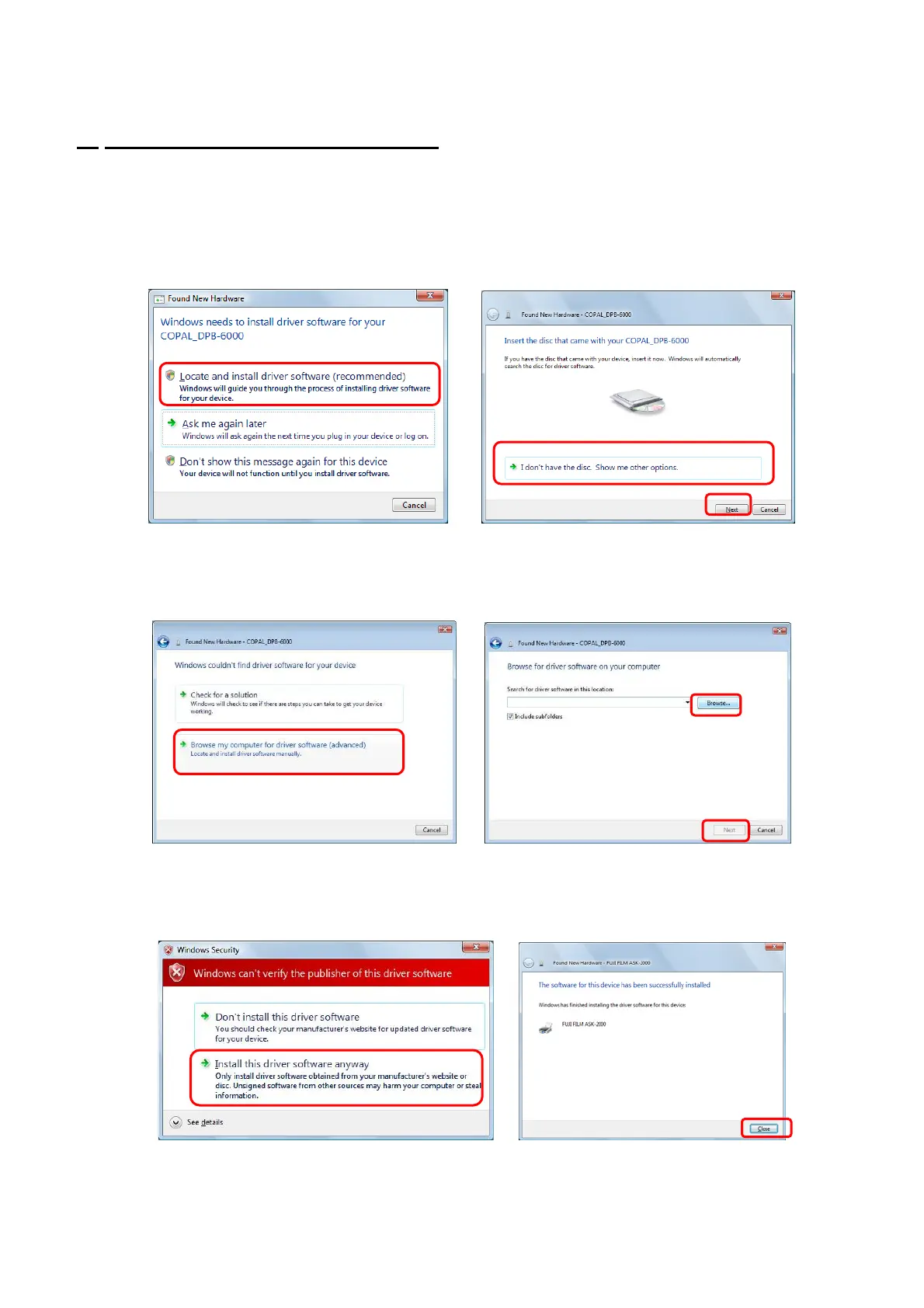
(3) Select [Locate and install driver software (recommended)]. (Fig.1)
(4) Select [I don’t have the disc. Show me other options.] , then choose [Next]. (Fig.2)
[Fig.1] [Fig.2]
4/28
(5) Select [Browse my computer for driver software (advanced)]. (Fig.3)
(6) [Browse] is clicked, and the folder where the driver software is preserved is specified. After it
specifies it, [Next] is clicked. (Fig.4)
[Fig.3] [Fig.4]
(7) While a warning for non-verified driver software will be displayed, click [Install this driver software
anyway].(Fig.5)
(8) After a short while, the installation of the printer driver will complete. Click [Close]. (Fig.6)
[Fig.5] [Fig.6]
(9)
It may sometimes happen that the printer driver storage folder has to be designated again.
Follow the instruction Chapter 9 “Troubleshooting” <<If the printer driver location is asked.>>.


 To Next Page