8. How to connect plural printers
You can connect plural printers. It makes easier to print different sizes. However, it does not always
work double in capability even if you connect 2printers because of the limitation of the image data
transfer speed from PC to the printers.
[In case of Windows 7]
When the printer is connected with USB port, the printer is automatically registered.
[In case of Windows Vista]
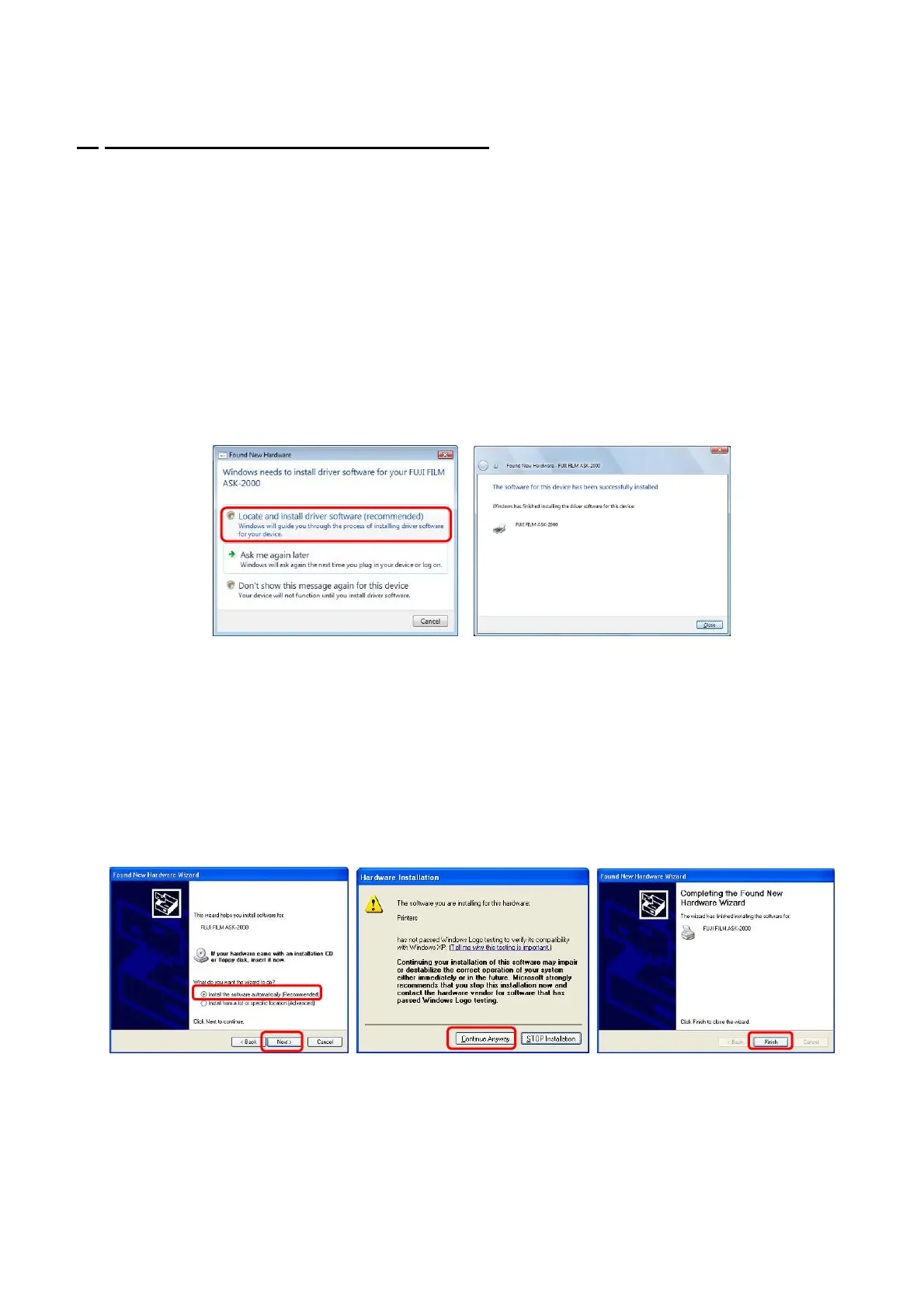
(1) Install the first one printer driver according to chapter 3 “How to install printer driver”.
(2) If you connect different USB port, the following message appears. Select [Locate and install driver
software (recommended)].
(Fig.45)
(3)
Printer Driver installation has been completed. Click [Close]. (Fig.46)
[Fig.45] [Fig.46]
(4)
Set up ICC profile to chapter 4 “How to use ICC profile”.
[In case of Windows XP]
(1) Install the first one printer driver according to chapter 3 “How to install printer driver”.
(2) If you connect different USB port, the following message appears. Choose [Install the software
automatically] and click on [Next]. (Fig.47)
(3) While a warning for hardware installation will be displayed, click [Continue Anyway].(Fig.48)
(4) After a short while, the installation of the printer driver will complete. Click [Finish]. (Fig.49)
[Fig.47] [Fig.48] [Fig.49]
(5) Set up ICC profile to chapter 4 “How to use ICC profile”.
< Remark > It does not run when the dedicated application software for ASK printer such as ASK print
module “SF-PM” and ASK printer driver are both installed in the PC. In this case, follow the
instruction of Chapter 9 “Troubleshooting” <<When printer driver cannot be installed. 2>>.
19/28


 To Next Page