33
Advanced
Features
32
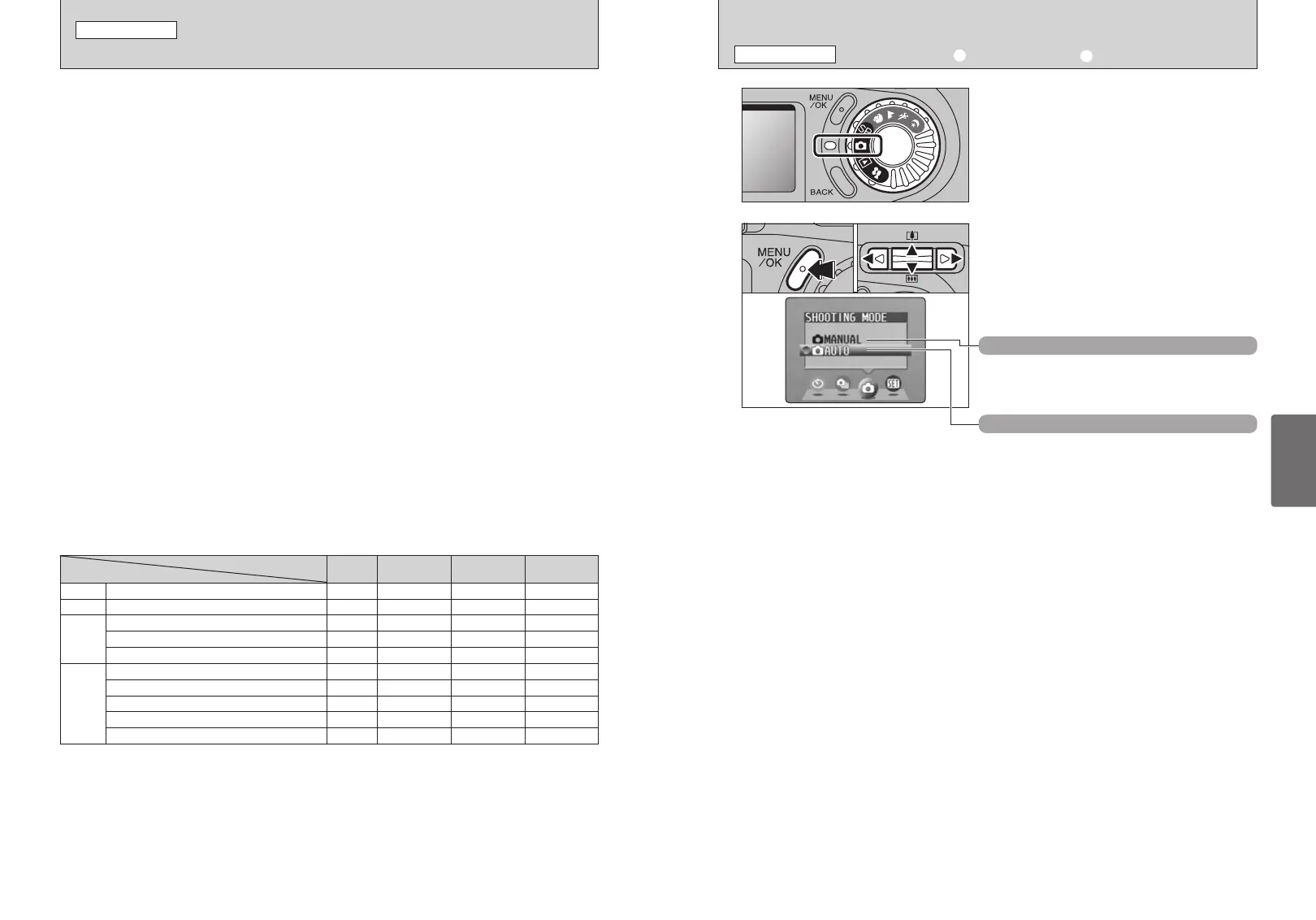
Set the Mode dial to “q”.
1
2
1Press the “MENU/OK” button to display the
menu.
2Press “d” or “c” to select “q” SHOOTING
MODE and then press “a” or “b ” to select
“qAUTO” or “qMANUAL”.
3Press the “MENU/OK” button to confirm the
selection.
This is the easiest mode for taking pictures and can
be used in a wide range of conditions.
01
qAUTO
This mode allows you to specify your own “EV
(exposure compensation) (➡ P.40) and White
Balance (➡P.40)” settings.
qMANUAL
02
03
TAKING PICTURES — SELECTING THE CAMERA SETTINGS
STILL IMAGE MODE
Consider the scene you are photographing and the sort of image you want to
achieve when you specify the camera settings. A general guide to the procedure
is given below.
1
Select the photography mode
a
Leaves the “EV” and “White balance” settings to the camera.
s
Allows you to set the “EV” and “White balance” yourself.
? Allows you select a Scene Position (m, ,, . or /).
2
Specify the Required Photography Function Settings
d
Flash Use the flash for shots in dark locations or for
backlit subjects, etc.
e
Macro Use these functions for close-up shots.
*
Self-timer The self timer is used in situations such as group
shots where the photographer is included in the
shot.
D
EV Using the AE exposure as a reference value of 0,
this function brightens (+) or darkens (–) the shot.
A
White balance
Used to fix the white balance to suit the photography
conditions and lighting.
f
Continuous shooting Allows you use continuous shooting.
3
Take the Photograph
■ Photography Mode Specifications
c
d FLASH (AUTO/b/d/v/c/n)
YES
YES
✽
YES
d
e MACRO (ON/OFF)
y Quality
S ISO
J FinePix color
YES
YES
YES
YES
NOYES
YESYES
YESYES
YESYES
Menu
FinePix
Photo
mode
* SELF-TIMER
(ON/OFF)
YES YESYES
f CONTINUOUS SHOOTING
YES YESYES
∞ SCENE POSITION (m/,/.//)
D EV (Exposure compensation –2.1 to +1.5)
A WHITE BALANCE (8/-/0/9/7/6/AUTO)
NO
YES
✽
NO
NO
NO
NO
NO
YES
YES
a
Default
Setting
AUTO
OFF
1M
AUTO
✽1
p-STANDARD
OFF
OFF
m
0
AUTO
s
?
✽1 The factory default S setting for s mode is 200.
✽ Some restrictions apply to the available flash modes depending on the SP menu setting (
m, ,, . or /) (➡P.34).
✽ The factory default image quality for Movie mode is 320 × 240 pixels.
SELECTING a AUTO OR s MANUAL
STILL IMAGE MENU








 To Next Page