47
Advanced
Features
46
01 02
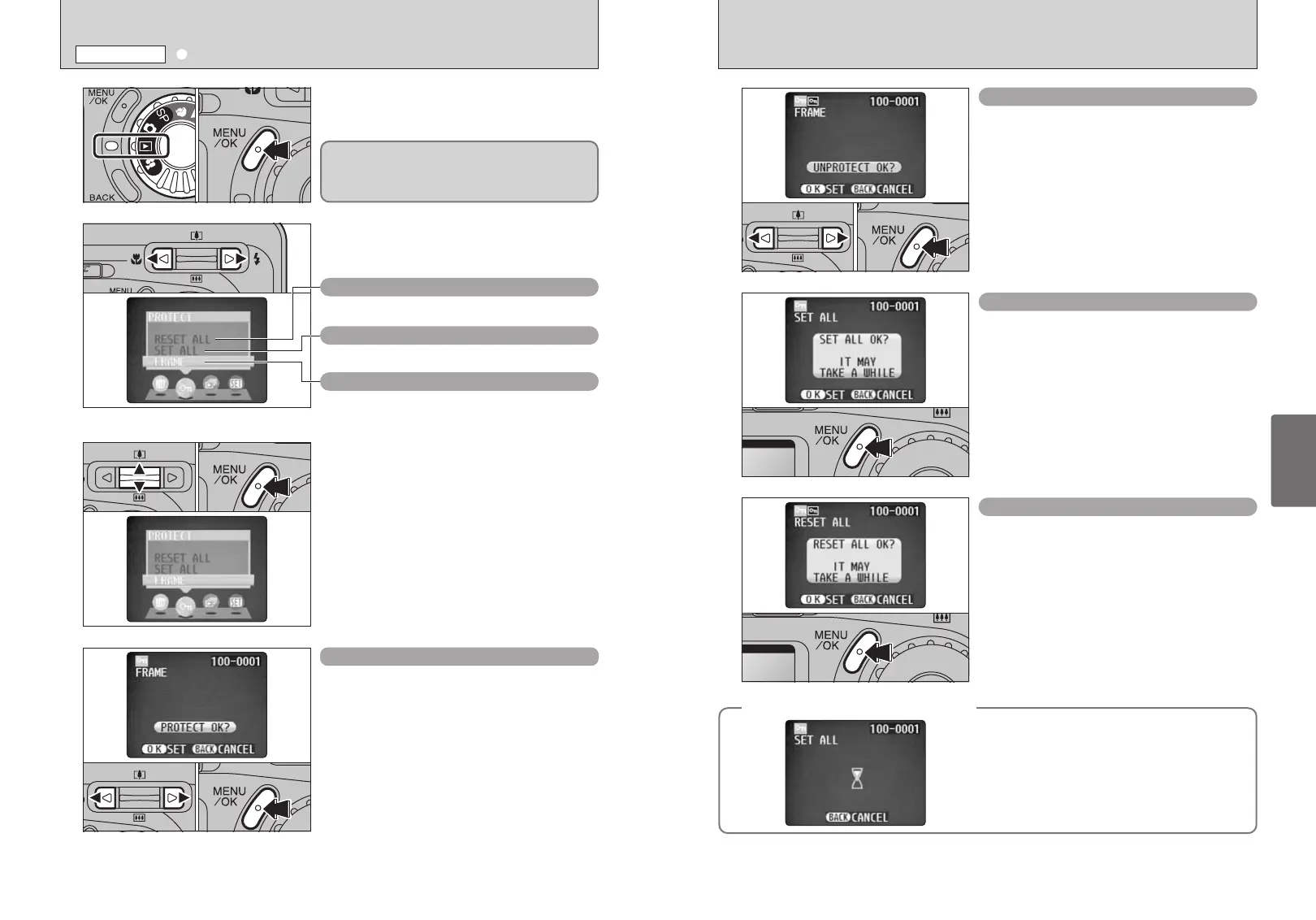
1Press “d” or “c” to select the protected file.
2Press the “MENU/OK” button to unprotect the
displayed file.
FRAME RESET
Press the “MENU/OK” button to protect all the files.
SET ALL
Press the “MENU/OK” button to unprotect all the
files.
RESET ALL
◆
To stop the procedure mid-way
◆
If large number of images are recorded in the xD-
Picture Card, protecting or unprotecting all the
frames may take some time.
If you want to shoot a picture or a movie during the
procedure, press the “BACK” button. To then return
to protecting or unprotecting all the frames, start the
procedure on P.46 from step
1.
1
2
3
4
1Set the Mode dial to “w”.
2Press the “MENU/OK” button to display the
menu screen.
Press “d” or “c” to select “i” PROTECT.
1Press “a” or “b” to select “FRAME”, “SET ALL”
or “RESET ALL”.
2Press “MENU/OK” button to confirm your
selection.
1Press “d” or “c” to select the file to be protected.
2Press the “MENU/OK” button to protect the file
currently displayed.
To protect another file, repeat steps 1 and 2. To
finish protecting files, press the “BACK” button.
FRAME SET
Protection is a setting that prevents frames (files)
from being accidentally erased. However, the
“FORMAT” function erases all the frames (files),
including protected frames (files) (➡P.52).
01 02
01 02
01 02
RESET ALL
Removes the protection from all the frames (files).
SET ALL
Protects all the frames (files).
FRAME
Protects or unprotects only the selected frame
(file).
●
!
It may take a while for excuteing this function depending on
the number of images.
●
!
It may take a while for excuteing this function depending on
the number of images.
i
PROTECTING IMAGES FRAME, SET ALL, RESET ALL
PLAYBACK MENU














 To Next Page