8 9
Basic Operation Guide
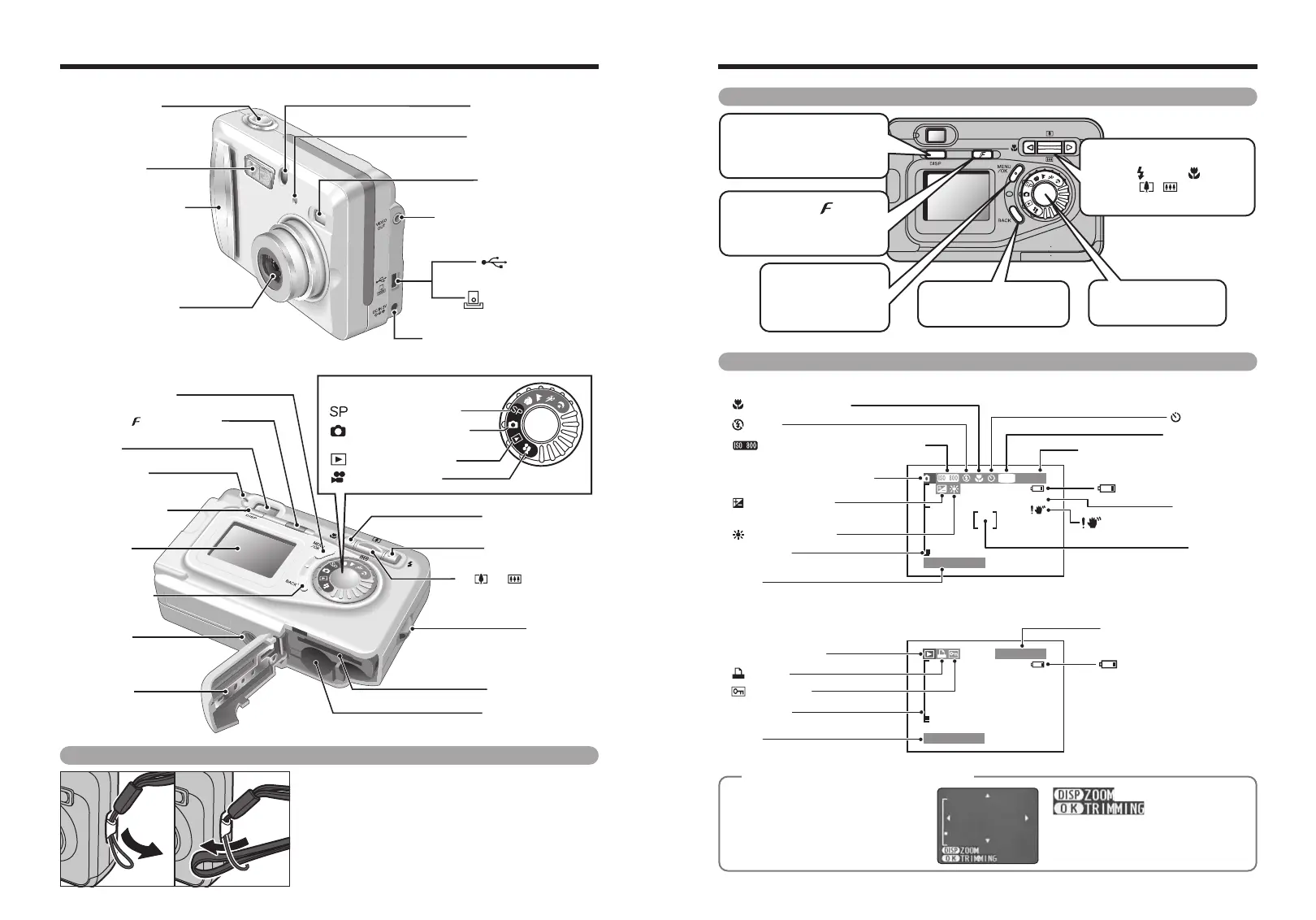
Example of LCD Monitor Text Display
■ Still Photography mode
!AF
M
1M
33
100−0001
2003. 1. 1
2003. 1. 1
Macro (close-up)
Self-Timer
White balance
Sensitivity (Only displayed
for 800)
Number of remaining shots
Camera shake warning
AF warning
Battery level warning
Battery level warning
Quality mode
EV (Exposure
compensation)
AF frame
Flash
Still photography mode
Zoom bar
Zoom bar
Date
Protection
DPOF
Playback mode
Date
Playback frame number
■ Playback mode
◆
Displaying the On-screen Help
◆
Instructions for the next step in the
procedure are displayed at the bottom
of the LCD monitor. Press the button
indicated.
Press the “DISP” button to use the
zoom or the “MENU/OK” button to crop
the image.
Nomenclature ✽ Refer to the pages in parentheses for information on using the camera features.
Power switch (P.14)
VIDEO OUT (Video output)
socket (P.62)
Self-timer lamp (P.38)
Shutter button
(USB) socket
Cradle connection
socket
(P.63)
DC IN 3V (power input) socket
(P.63)
Viewfinder Window
Lens (Lens cover)
Flash control sensor
Flash
(P.35)
Photo mode ( ) button (P.9, 26)
a( )b( )/Zoom switch
(P.9, 18, 22)
【 】
xD-Picture Card slot
Battery compartment
Tripod mount
Viewfinder
Battery cover
Viewfinder lamp
LCD monitor
DISP button
(P.9, 22)
Still Photography mode
(P.17)
Scene Position (P.34)
Playback mode (P.23)
Movie mode (P.41)
dMacro button (P.35)
cFlash button (P.35)
Strap mount
MENU/OK button
(P.9)
Mode dial
BACK button (P.9)
Attaching the strap
Attach the strap as shown in 1 and 2.
01 02
0 DISP button
Switches the LCD monitor
display
0 abdc button
h Flash( )/Macro( ) setting
h Zoom ( / )
h Move the cursor in menus
0 Photo mode ( ) button
Displays the Photo mode
menu
0 MENU/OKbutton
Confirms the menu
display mode
selection
0 BACK button
Cancels the operation
0 Mode dial
Switches the mode








 To Next Page