61
Software
Installation
60
INSTALLATION ON A Mac OS X
Only FinePixViewer is installed on Mac OS X.
●
!
AVI movies cannot be played back on version 10.0.4.
1
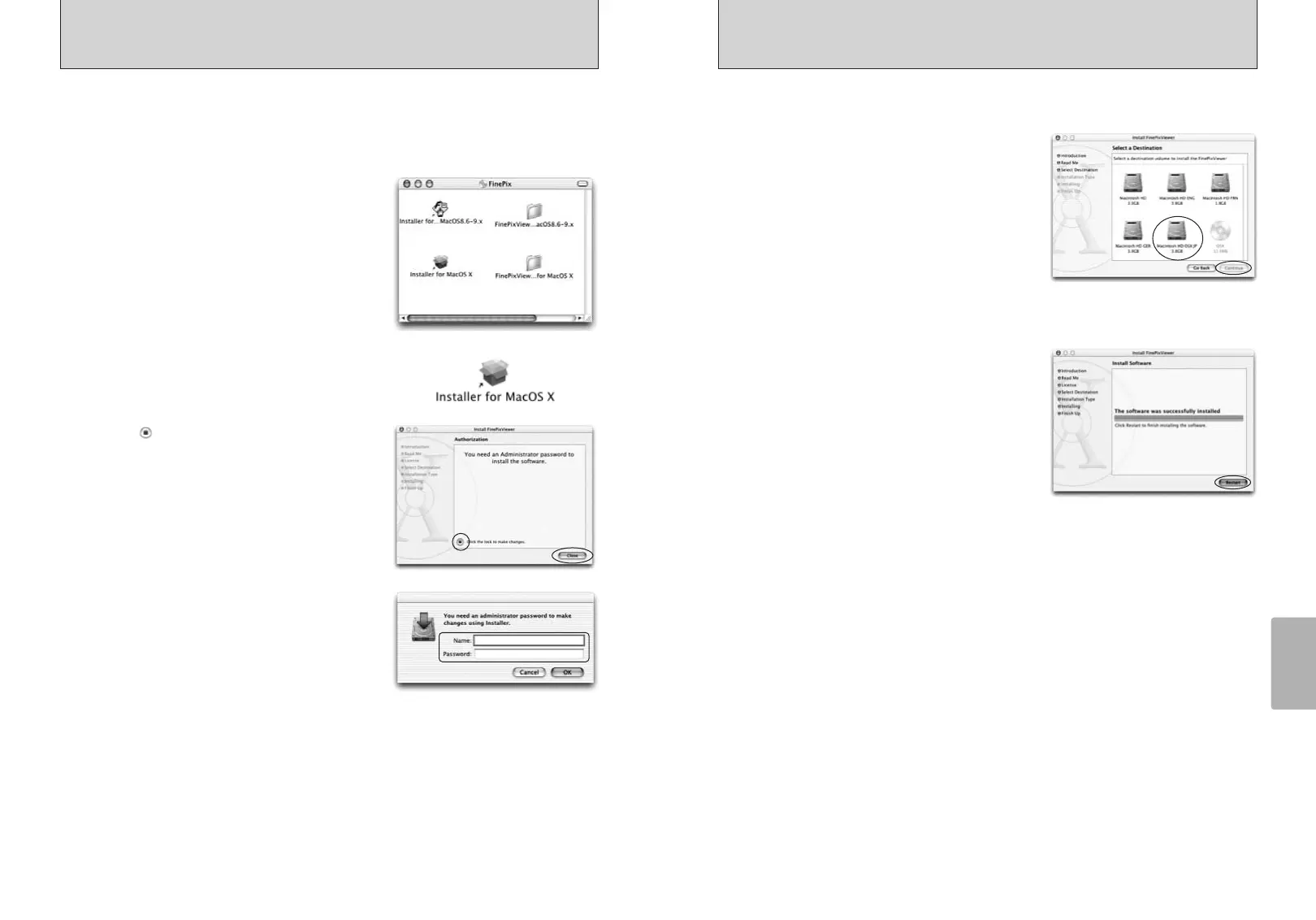
Switch your Macintosh on and start up Mac OS X. Do not launch any other applications.
2
Load the enclosed CD-ROM into the CD-ROM drive.
The “FinePix” window opens.
●
!
If the “FinePix” window does not open automatically, double-
click the CD-ROM icon.
3
Double-click “Installer for MacOS X”.
4
Click the “ ” icon.
5
Enter the administrator name and password. Then
click the [OK] button.
6
Click the [Continue] button.
7
Quit any other programs that are running and then click the [Continue] button.
9
Select the Mac OS X startup disk as the installation
destination and click the [Continue] button.
10
Click the [Install (upgrade)] button.
11
When you have completed the installation, click the
[Restart] button.
8
Click the [Continue] button in the “Software License Agreement” window.









 To Next Page