6-7
6.2 Mouse/Keyboard/Light Box (Optional)
6
Removal
1. Remove the light box(See Subsection 6.2.5).
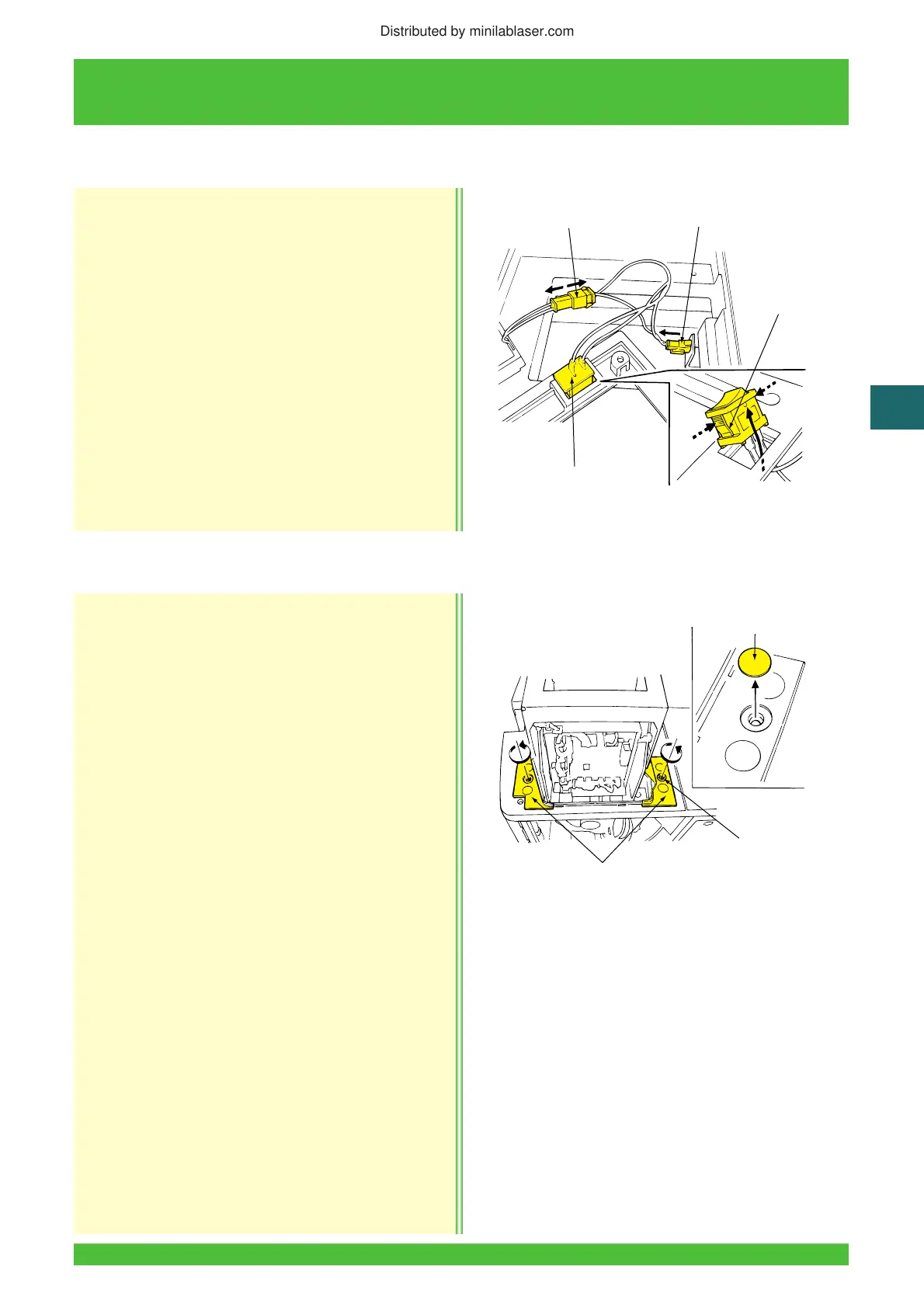
2. Disconnect the harness connector.
3. Release the lock tabs and remove the switch from
the cover.
Installation
Installation is essentially in the reverse order of
removal.
Removal
1. Remove:
• Scanner section front cover
(See Subsection 8.2.3).
• Operation keyboard assembly
(See Subsection 6.2.2)).
• Light box (optional)
(See Subsection 6.2.5).
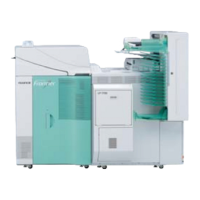
2. Peel the two seals from the center of the scanner
base covers.
3. Remove the two screws and then the two scanner
base covers.
6.2.6 Light Box (Optional) Switch Replacement
Z2118
Light Box Switch
Harness Connector
Connector
Lock Tabs
6.2.7 Table Upper Cover Removal/Reinstallation
Z2105
Seals (2)
Screws (2)
Base Covers (2)
Distributed by minilablaser.com












 To Next Page