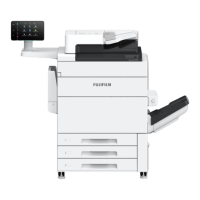
This document serves as the User's Manual for the Fujifilm Revoria Press EC1100, providing comprehensive instructions for its operation, maintenance, and safety. It emphasizes proper handling and care to ensure optimal performance and longevity of the device.
Function Description
The Revoria Press EC1100 is a printing machine designed for professional use. Its primary function is to produce high-quality prints, supporting various paper sizes and weights. The device incorporates a control panel for user interaction, allowing for easy navigation and setting adjustments. It also features an NFC touch area for seamless communication with NFC-supported mobile devices, enhancing interactive capabilities. The machine is equipped with a Power/Power Saving button to manage power states and an indicator lamp to display operational status and errors.
Usage Features
Control Panel and Home Screen:
The control panel is the central interface for operating the Revoria Press EC1100. Pressing the Home button immediately displays the Home screen, which provides an overview of the machine's status and remaining consumables. This screen is crucial for monitoring the device and planning print jobs.
Power Management:
The Power/Power Saving button controls the machine's power state. A brief press switches the power on, initiating a warm-up period of approximately 5 minutes before the printer is ready for use. The warm-up time can vary based on the initial temperature. The device automatically enters Power Saver mode after a period of inactivity to reduce power consumption. To fully power off the device, the user must press the Power/Power Saving button on the printer unit, then tap "Power Off Device" on the control panel. It's important to wait for the Power/Power Saving button light to go off before switching off the main power to prevent potential damage.
NFC Functionality:
The NFC touch area allows users to interact with the machine using NFC-supported mobile devices. This feature requires the NFC function of the machine to be enabled, facilitating quick and convenient data exchange.
Data and Status Indicators:
A data indicator blinks when data is being sent from or received by the machine, and it lights up when documents are saved. A status display lamp indicates the machine's operational state: green for operation reception and blinking orange for errors.
User Login and Authentication:
The machine supports user authentication through a login system where users enter a User ID. Administrators are identified as "[Administrator]" in the display area. Tapping this area logs out the user, reverting the machine to an unauthenticated state.
Menu Navigation:
A dedicated menu icon allows users to access and modify machine settings. Tapping this icon opens the menu, and tapping "[<]" closes it.
Paper Loading:
The Revoria Press EC1100 supports loading plain paper into trays 1 to 3. Users must pull out the paper tray until it stops, fan the stack of paper well to prevent jams, and then load the paper with the print surface facing down, aligning the edges according to the arrow. Guide clips must be adjusted to the correct paper size to prevent jams. The machine accommodates standard sizes (Max: A3, 11x17"; Min: A5) and non-standard sizes (140x182 mm to 330x488 mm), with paper weights ranging from 64 to 256 g/m². After loading, paper information must be set in the [Tray Settings] window on the Media Library Manager.
Print Server Integration:
The machine integrates with a Print Server, which must be powered on and have the Media Library Manager running for full functionality. Paper settings for printing are configured through the Print Server.
Maintenance Features
Circuit Breaker Switch:
The machine is equipped with a circuit breaker switch, normally in the upper position. For extended periods of non-use or when moving the machine, the switch should be turned off by pressing it to the lower position. In case of a fault current, the circuit breaker automatically turns off to discontinue electrical flow, ensuring safety. Users are advised not to touch the breakers under normal conditions.
Safety Guidelines:
The manual provides extensive safety notes, including warnings and cautions regarding electrical safety, handling of consumables, and general machine operation. These guidelines are crucial for preventing injuries, electric shock, fire, and machine malfunction.
Consumables Handling:
Users are instructed to store all consumables according to their packaging instructions. Specific warnings are given against using vacuum cleaners for spilled toner (due to fire/explosion risk), throwing toner cartridges or waste toner containers into open flames, and spilling toner on skin or in eyes. In case of spills, immediate action (washing with soap and water, rinsing eyes, seeking medical attention) is advised.
Environmental Considerations:
Proper disposal of consumables is required, and users are instructed not to open them but to return them to their local representative. The manual also highlights the importance of proper ventilation during extended operation or mass printing to manage odors like ozone.
Machine Installation and Placement:
Guidelines for machine installation include avoiding locations where power cords might be stepped on or tripped over, or near heat sources, flammable materials, direct sunlight, or humidifiers. The machine should be placed on a level, sturdy surface capable of supporting its weight (minimum 727 kg). Adequate ventilation is necessary, and ventilation openings should not be obstructed. The machine should not be inclined more than 10 degrees. Wheels must be locked after installation to prevent movement.
Cable Management:
To prevent defects, users are advised to bundle wires and cables using only the cable ties and spiral tubes supplied by the company.
Laser Safety:
The Revoria Press EC1100 is a Class 1 Laser Equipment, designed with light protection components and covers to prevent hazardous light exposure during operation and maintenance. Users are warned against any operations or adjustments not stated in the manual, as these could cause hazardous light exposure.
E-Waste Management (India):
The manual includes specific guidelines for E-Waste management in India, emphasizing proper handling and recycling through authorized recyclers. It details "Do's" and "Don'ts" for e-waste disposal, such as segregating e-waste from household waste and not opening the product oneself.
Support and Spare Parts:
The company commits to storing necessary spare parts for 7 years after the production termination of the machine to ensure continued functionality.


 To Next Page

 General