28
Display Settings
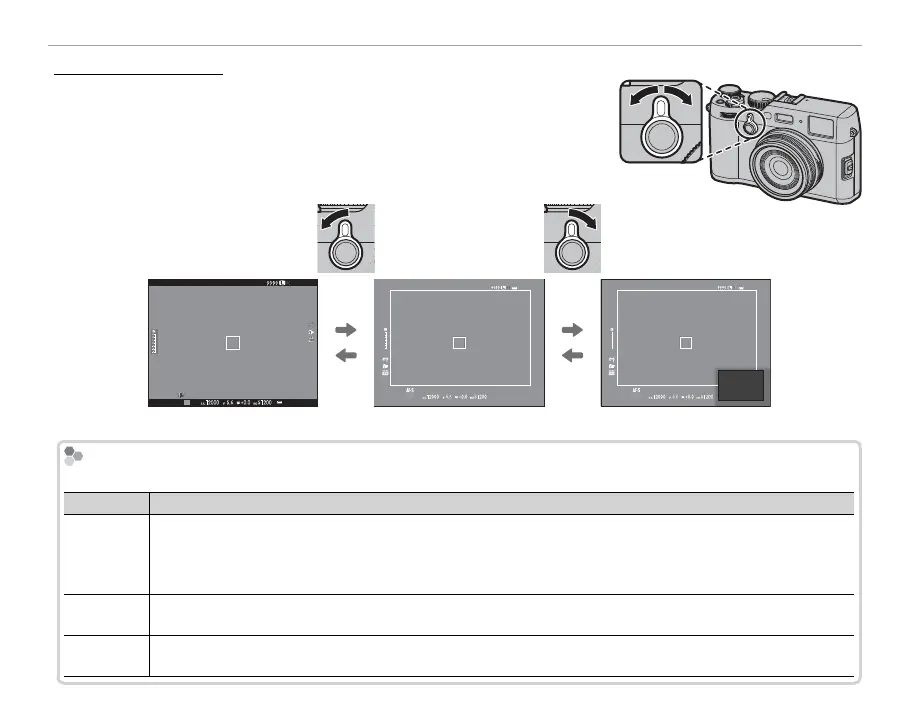
The View nder Selector
Use the view nder selector to switch between the electronic view-
nder (EVF), the optical view nder (OVF), and a dual optical view nd-
er/electronic range nder (ERF) display.
P
3
2
1
0
-1
-2
-3
P
3
2
1
0
-1
-2
-3
P
EVF OVF ERF (dual display)
The Hybrid (EVF/OVF/ERF) View nder
The Hybrid (EVF/OVF/ERF) View nder
The features of the di erent displays are described below.
Display
Description
OVF
The optical display is sharp and free of blur so that your subject’s expression is always visible. In addition, the
OVF shows the area just outside the frame, making it easier to compose shots on the y. Because the view nder
window is a slight distance from the lens, the area visible in photographs may however di er slightly from the
display in the view nder due to parallax.
EVF
The live view display gives you a preview of the nal picture, including depth of eld, focus, exposure, and white
balance. Frame coverage is approximately 100%, ensuring accurate framing under all conditions.
ERF
(dual display)
As for the optical view nder but with a focus preview. A magni ed view of an area of the frame including the
current focus position is shown at the bottom right corner of the display.


 To Next Page