40
Basic Movie Recording and Playback
Basic Movie Recording and Playback
Recording Movies
The camera can be used to record high-de nition movies. Sound is recorded in stereo via the built-in
microphone; do not cover the microphone during recording.
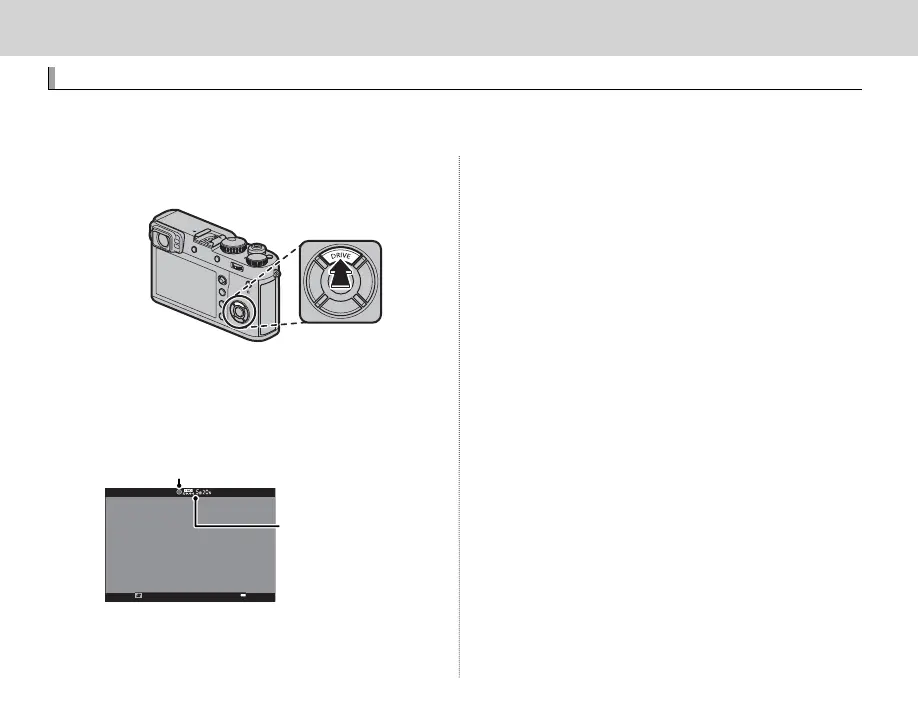
1
Press the DRIVE (e) button to display drive mode
options.
2
Highlight F (MOVIE) and press MENU/OK to
enter movie recording standby mode.
3
Press the shutter button to start recording.
Recording indicator
Time remaining
Q The indicator lamp lights while movies are being
recorded.
4
Press the button again to end recording. Re-
cording ends automatically when the maximum
length is reached or the memory card is full.
R Frame size and rate can be selected using W MOVIE
SETTING> MOVIE MODE ( P 105). Focus mode is se-
lected using the focus mode selector (P 68); for con-
tinuous focus adjustment, select C, or choose S and
enable Intelligent Face Detection (P 95). Intelligent
Face Detection is not available in focus mode M.
R The view nder automatically switches to the EVF
display when F (MOVIE) is selected for drive mode.
R During recording, exposure compensation can be
adjusted by up to ±2 EV.
Q The microphone may pick up lens noise and other
sounds made by the camera during recording.
Q Vertical or horizontal streaks may appear in movies
containing very bright subjects. This is normal and
does not indicate a malfunction.


 To Next Page