5
FUJITSU Storage ETERNUS DX100 S3/DX200 S3 Hybrid Storage Systems Setup Guide
Copyright 2017 FUJITSU LIMITED
P3AM-7852-06ENZ0
Various cables need to be connected to the ports on the rear of the ETERNUS DX.
Cable Connection
STEP
●
To help with cable management and prevent incorrect connection, attach labels to the cables and make a
note of connection origins and destinations.
●
This step describes dual controller type as an example. Note that there is only controller 0 (CM#0) for single
controller type.
Point
●
The cables should never be bent, twisted or pulled.
●
Some cables have static-sensitive electronic components. Wear an anti-static wrist strap or touch a metal
part to discharge the static electricity on your body before starting each operation. Failure to discharge static
electricity before touching the connectors may cause a device failure.
IMPORTANT
Configuration Guide (Basic)
3.
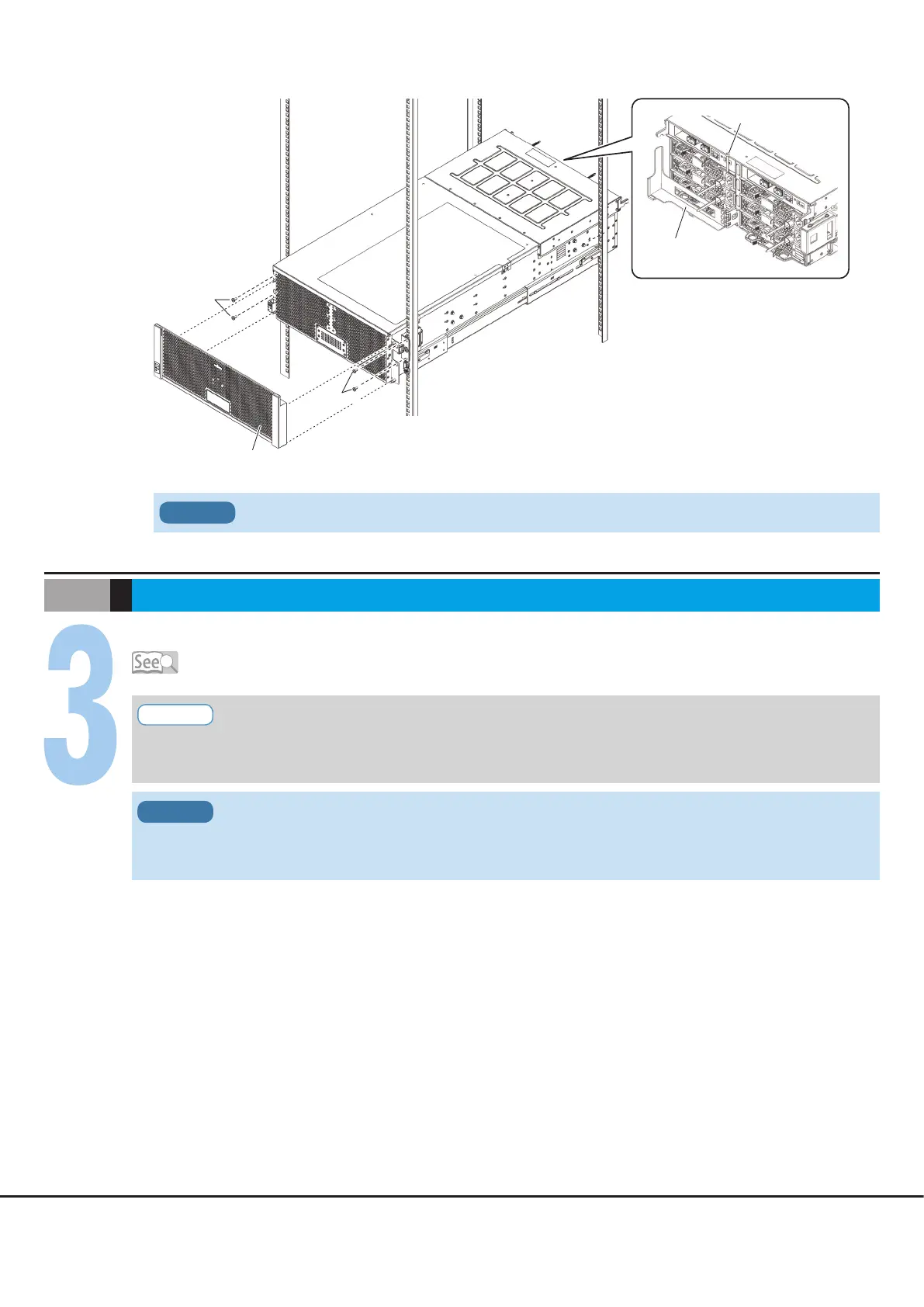
Install and fasten the high-density drive enclosure in the rack, and then attach the front cover.
Attach the cable management arm in the rear.
For safety and stability, use a lifter to install or remove high-density drive enclosures in the rack.
IMPORTANT
Front cover
(Rack pillar: front)
(Rack pillar: rear)
M5 screws
M5 screws
Cable
management arm
Pin











 To Next Page