8
FUJITSU Storage ETERNUS DX100 S3/DX200 S3 Hybrid Storage Systems Setup Guide
Copyright 2017 FUJITSU LIMITED
P3AM-7852-06ENZ0
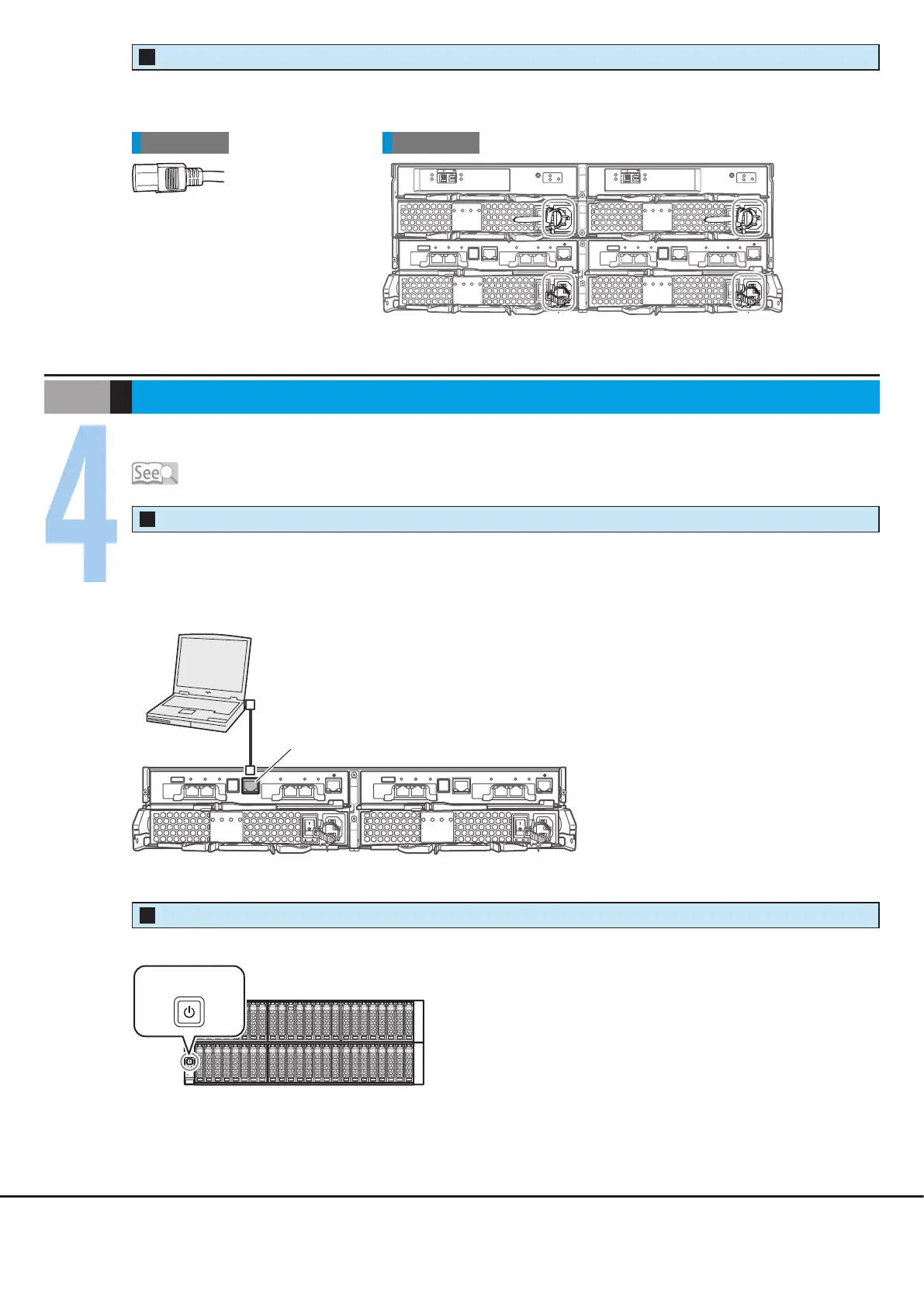
Connect the power cords to the inlets of the power supply unit.
Use release ties to hold the power cords in place.
Rear viewCable
Drive enclosure
Controller enclosure
Power Cords
4
Use ETERNUS Web GUI to perform a basic setup of the ETERNUS DX.
Connect a PC terminal to the ETERNUS DX.
Connect the PC terminal to the RMT port of Controller 0 (CM#0) on the controller enclosure directly with the LAN
cable.
Turn on the PC terminal and the ETERNUS DX.
PC terminal
LAN cable
LAN port
Controller enclosure
RMT port of Controller 0 (CM #0)
Basic Setup
STEP
Configuration Guide (Basic)
Controller enclosure
Power switch
Drive enclosure
ETERNUS DX and PC Terminal Connection
1
Powering On
2











 To Next Page