6
FUJITSU Storage ETERNUS DX100 S3/DX200 S3 Hybrid Storage Systems Setup Guide
Copyright 2017 FUJITSU LIMITED
P3AM-7852-06ENZ0
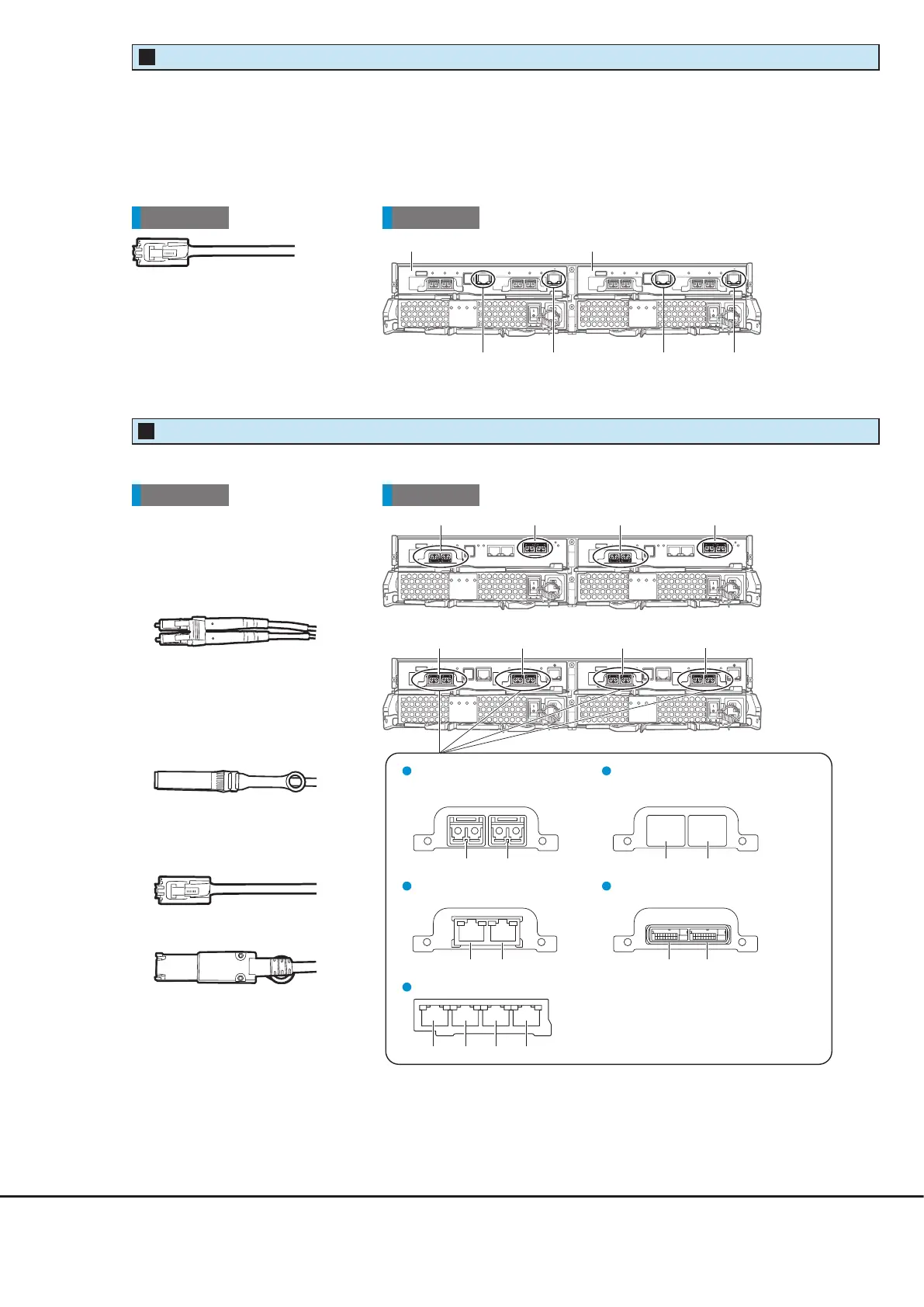
●
FC,
iSCSI 10Gbit/s (10GBASE-SR),
FCoE,
Ethernet 10Gbit/s
(for FC cable connection)
●
iSCSI 10Gbit/s (10GBASE-T),
iSCSI 1Gbit/s,
Ethernet 1Gbit/s
●
SAS
Connect a Host Interface cable to each of these ports.
Rear viewCable
●
iSCSI 10Gbit/s (10GBASE-SR),
FCoE,
Ethernet 10Gbit/s
(for Copper Twinax cable
connection)
Controller enclosure
iSCSI 10Gbit/s (10GBASE-T),
iSCSI 1Gbit/s
Port#0 Port#1
SAS
Port#0 Port#1
Port#0 Port#1
FC, iSCSI 10Gbit/s (10GBASE-SR),
FCoE, Ethernet 10Gbit/s
(for FC cable connection)
Port#0 Port#1
iSCSI 10Gbit/s (10GBASE-SR),
FCoE
, Ethernet 10Gbit/s
(for Copper Twinax cable connection)
Ethernet 1Gbit/s
Port#0 Port#1 Port#2 Port#3
Host Interface Cable
2
CA#1 CA#0 CA#1 CA#0
Controller enclosure
Rear viewCable
●
MNT port
A port that is used to connect to an operation management LAN. Before connecting to the operation
management LAN, change the IP address of the MNT port in the Setup Network Environment settings.
●
RMT port
A port that is used for initial setup or to connect to the remote support center.
Controller (CM#0) Controller (CM#1)
MNT por
NT port
Controller enclosure
RMT port RMT port
LAN Cable
1











 To Next Page