En-13
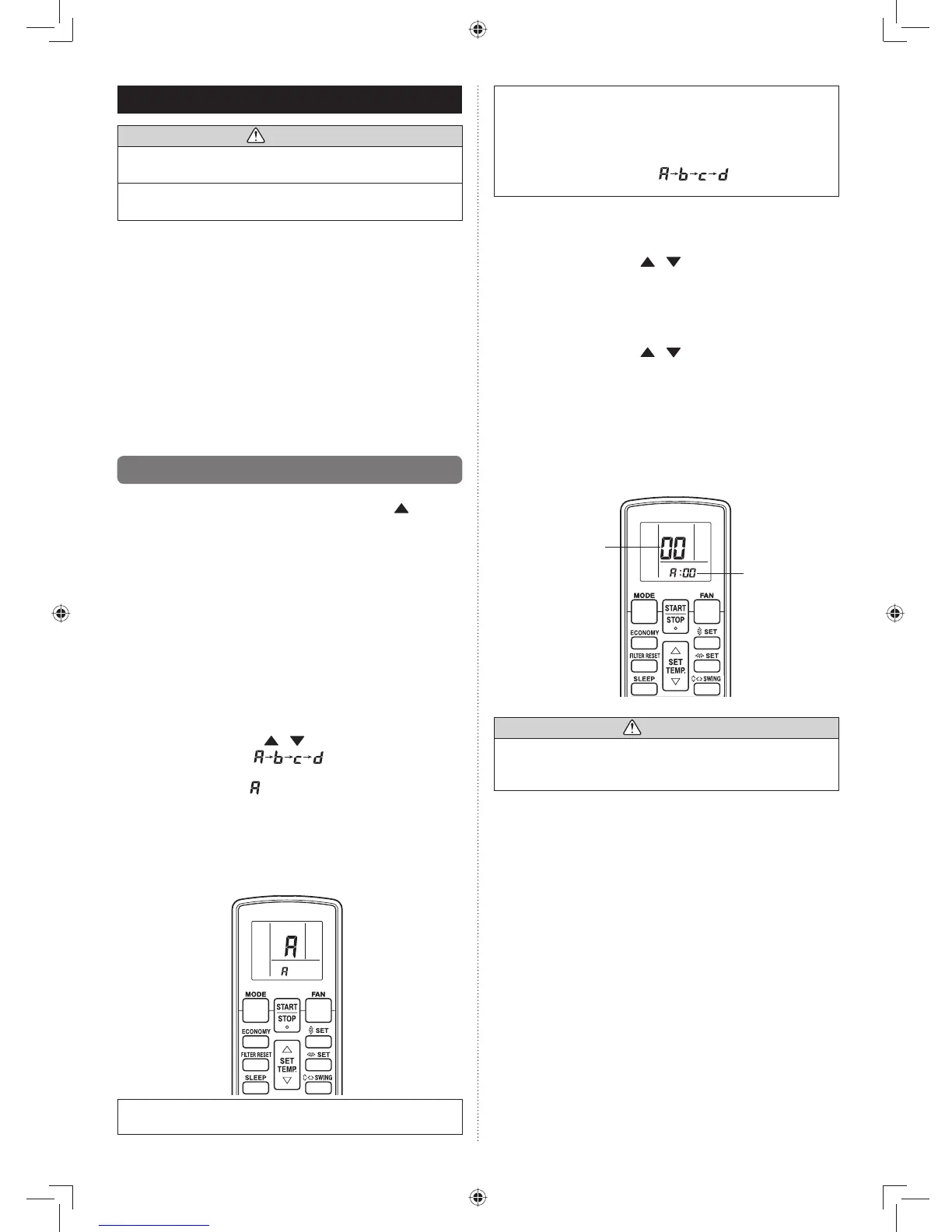
The remote control unit resets to signal code A when the
batteries in the remote control unit are replaced. If you use a
signal code other than signal code A, reset the signal code
after replacing the batteries.
If you do not know the air conditioner signal code setting,
try each of the signal codes ( ) until you fi nd the
code which operates the air conditioner.
STEP 2
Selecting the Function Number and Setting Value
Press the SET TEMP. ((1) ) ( ) buttons to select the func-
tion number. (Press the MODE button to switch between
the left and right digits.)
Press the FAN button to proceed to setting the value. (2)
(Press the FAN button again to return to the function
number selection.)
Press the SET TEMP. ((3) ) ( ) buttons to select the set-
ting value. (Press the MODE button to switch between the
left and right digits.)
Press the TIMER MODE button, and START/STOP button, (4)
in the order listed to confi rm the settings.
Press the RESET button to cancel the function setting (5)
mode.
After completing the FUNCTION SETTING, be sure to turn (6)
off the power and turn it on again.
Function number
Setting valu
CAUTION
After turning off the power, wait 30 seconds or more •
before turning on it again. The FUNCTION SETTING
doesn’t become effective if it doesn’t do so.
9. FUNCTION SETTING
CAUTION
Confi rm whether the wiring work for outdoor unit has •
been fi nished.
Confi rm whether the cap for electric control box on the •
outdoor unit is close.
This procedure changes to the function settings used to con-•
trol the indoor unit according to the installation conditions.
Incorrect settings can cause the indoor unit malfunction.
After the power is turned on, perform the “FUNCTION •
SETTING” according to the installation conditions using the
remote controller.
The settings may be selected between the following two: •
Function Number or Setting Value.
Settings will not be changed if invalid numbers or setting •
values are selected.
Refer to the installation manual enclosed with the remote •
control unit when the wired remote control unit (option) is
used.
9.1. Operation method
While pressing the FAN button and SET TEMP. (• ) simul-
taneously, press the RESET button to enter the function
setting mode.
STEP 1
Selecting the Remote Control Unit Signal Code
Use the following steps to select the signal code of the remote
control unit.
(Note that the air conditioner cannot receive a signal code if
the air conditioner has not been set for the signal code.)
The signal codes that are set through this process are ap-
plicable only to the signals in the FUNCTION SETTING. For
details on how to set the signal codes through the normal
process, refer to SELECTING THE REMOTE CONTROL
UNIT SIGNAL CODE.
Press the SET TEMP. ((1) ) ( ) button to change the
signal code between .
Match the code on the display to the air conditioner signal
code. (initially set to ) (If the signal code does not need
to be selected, press the MODE button and proceed to
STEP 2.)
Press the TIMER MODE button and check that the indoor (2)
unit can receive signals at the displayed signal code.
Press the MODE button to accept the signal code, and (3)
proceed to STEP 2.
The air conditioner signal code is factory-set to A .
Contact your retailer to change the signal code.



 To Next Page