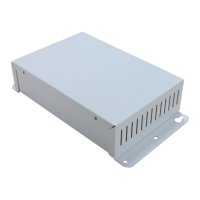
The BACnet Gateway for VRF System, model UTY-VBGX, is designed for the integration of Fujitsu air conditioning systems into BACnet/IP enabled monitoring and control systems. This gateway acts as a server, facilitating remote monitoring and control of Fujitsu VRF air conditioning systems from a central control center using any commercial SCADA or monitoring software equipped with a BACnet/IP driver. It supports BACnet/IP communication, allowing for polling and subscription requests (COV).
Function Description
The gateway continuously polls the VRF network for all configured signals, maintaining an updated status of these signals in its memory, ready to be served upon request from the BACnet side. Its primary role is to associate elements of Fujitsu General Limited (FGL) indoor and outdoor units with BACnet objects. Control of indoor and outdoor units via the FGL bus is also permitted, enabling commands to be sent to these units. Each indoor and outdoor unit is represented by a set of BACnet objects, including status, command, and error objects for both the gateway itself, indoor units, and outdoor units.
The UTY-VBGX model supports up to 128 indoor units and 100 outdoor units, managing a single independent VRF system and up to 32 refrigerant systems. It makes available up to 5000 FGL control and status objects. Configuration is straightforward, requiring only the selection of appropriate communication parameters.
Important Technical Specifications
The BACnet Gateway for VRF System adheres to BACnet Protocol Revision 14 and supports the BACnet Application Specific Controller (B-ASC) standardized device profile.
Data Link Layer Options:
- BACnet IP (Annex J)
- BACnet/IP Broadcast Management Device (BBMD)
Segmentation Capability:
- Segmented request supported: Yes (Window Size: 16)
- Segmented responses supported: Yes (Window Size: 16)
Character Sets Supported:
Supported Object Types:
- Analog Input (AI): For monitoring set temperature, space temperature, auto temperature limits (low/high for cool/heat modes), indoor unit existence, operation status, thermostat OFF status, filter sign status, emergency status, error status, and temperature limit validity.
- Analog Output (AO): For setting batch set temperature, and individual indoor unit set temperature and auto temperature limits.
- Binary Input (BI): For monitoring gateway energy saving status, gateway error status, indoor unit existence, operation status, thermostat OFF status, filter sign status, emergency status, error status, temperature limit validity, outdoor unit error status, and forced OFF status.
- Binary Output (BO): For setting gateway energy saving, batch operation, indoor unit operation, thermostat OFF, reset filter, temperature limit validity, and outdoor unit forced OFF.
- Multistate Input (MI): For monitoring gateway error codes, indoor unit operation mode, fan speed, vertical and horizontal airflow direction, remote controller prohibition, managed mode, indoor unit error codes, outdoor unit error codes, capacity save status, and low noise operation status.
- Multistate Output (MO): For setting batch operation mode, fan speed, remote controller prohibition, indoor unit operation mode, fan speed, vertical and horizontal airflow direction, remote controller prohibition, outdoor unit low noise operation, and capacity save.
- Device (8): UTY-VBGX (Device Instance: 144)
- Notification Class (15): NotificationClass_x
Mechanical & Electrical Characteristics:
- Enclosure: Material: Plastic (UL 94 V-0), Dimensions: 270mm x 176mm x 60mm, Weight: 1.2 Kg, Color: Light Grey RAL 7035. Wall recommended mounting.
- Power: Screw terminal block (3 poles), 208 to 240VAC, 50 to 60Hz, 4.6W max.
- Terminal Wiring: Per terminal: solid or stranded wires (twisted or with ferrule). 1 core: 0.5 – 2.5mm², 2 cores: 0.5 – 1.5mm², 3 cores: not permitted.
- Ethernet Port: RJ45 for shielded CAT5 or higher cable, 10/100 Mbps communication speed. Communicates with BACnet IP network and PC for gateway configuration.
- Port A LON: A1 A2 (2 poles screw terminal) and Signal Ground. A3 A4 (2 poles screw terminal) for Fujitsu VRF network connection.
- USB Port: Mini Type-B receptacle connector, USB 2.0 compliant. For gateway configuration and diagnostic only. 1500VDC isolation from other ports.
- Battery: Coin 20mm x 3.2mm, 3V / 225mAh, Manganese Dioxide Lithium type.
- LED Indicators: 1 x Power, 1 x Error.
- Operational Temperature: 0°C to +46°C.
- Operational Humidity: 5% to 95%, non-condensing.
- Preservation Temperature: -10°C to +60°C.
- Protection: IP20 (IEC60529).
- RoHS Conformity: Compliant with RoHS directive (2002/95/CE).
Usage Features
The gateway offers comprehensive control over various aspects of the VRF system:
- Temperature Settings: Indoor unit set temperature can be commanded within a range of 10-30°C (48-88°F). Specific tables are provided for Fahrenheit and Centigrade values, with values outside the permissible range being rounded to the nearest limit. Auto mode temperature limits can also be set.
- Operation Mode: Indoor unit operation mode can be set to Cool, Heat, Fan, Dry, or Auto.
- Fan Speed: Fan speed can be set to Low, High, Med, Auto, Quiet, Med-Low, or Med-High.
- Airflow Direction: Vertical and horizontal airflow directions can be set, including a "Swing" option.
- Remote Controller Prohibition: Remote controller prohibition can be set for indoor units, with various states indicating which functions are prohibited (e.g., filter display reset, start operation, operation mode, set temperature, timer setting, or all).
- Outdoor Unit Control: Capacity save settings for outdoor units can be commanded (e.g., 100%, 90%, 80%, 70%, 60%, 50%, 40%). Low noise operation can also be commanded, with different levels and abilities to support performance priority or external input control. Forced OFF setting is also available for outdoor units.
A Windows® 7/8.1/10 compatible Configuration Tool is provided for monitoring and configuring the UTY-VBGX gateway.
- Project Management: Users can create new projects, load existing ones, or retrieve the current configuration from the device.
- Connection Modes: The tool supports both IP and USB connections to the gateway. For IP connection, the tool automatically scans the network, requiring a password (default: admin). For USB, a mini-type B USB cable is used.
- General Configuration: Allows setting the gateway name, project description, enabling/disabling DHCP, configuring IP address, netmask, default gateway, and access password. It also allows synchronizing the gateway's time with the PC.
- BACnet Server Configuration: Users can set the Device Name, Device Instance (must be unique for multiple gateways), Password, BACnet IP Mode (only BACnet IP available), UDP Port, and Network Role (Disabled, Foreign device, or BBMD). Advanced configuration allows for Notification Classes.
- Fujitsu VRF Configuration: Source Number (LON address) can be set (values 3-18, must be unique). Temperature units (Celsius or Fahrenheit) can be selected. Indoor units can be added manually or scanned automatically from the VRF network.
- Signals Viewer: This feature allows checking current signal values on both BACnet and VRF network sides. It's useful for supervision and testing. Values can be forced to a specific signal by double-clicking, which will update the object and trigger a command to the Fujitsu AC system if the signal is write-enabled.
Maintenance Features
- LED Status: The gateway features several LEDs (PWR, ERR, LNK, ACT, TX, RX, Service, IP address) to indicate power, error states, Ethernet link/activity, Fujitsu bus activity, BACnet TX/RX activity, LON port service status, and IP address assignment.
- Push Buttons: Two push buttons are available: PUSH_A sends an I-Am message on the BACnet/IP side, and PUSH_B acts as the service pin for the LON port.
- Diagnostic Tool: This tool allows checking the current communication status of the gateway on both BACnet and FGL sides.
- Hardware Test: Checks the current hardware status for faults.
- Log Record Mode: Enables logging of communications from all viewers and stores them in a zip file, which can be sent to support for troubleshooting.
- Commands: Provides specific commands for maintenance purposes, such as INFO? (identifies gateway, shows basic info), RESET! (resets gateway, not factory settings), Enable COMMS (enables communication with Configuration Tool), and Disable COMMS (disables communication with Configuration Tool).
- Viewers: Dedicated viewers for BACnet Server and Fujitsu VRF provide specific information for internal maintenance.
Safety Precautions:
The manual emphasizes safety precautions for installation and operation, including proper grounding, use of specified cables and tools, correct tightening torques, static electricity discharge, and avoiding installation in hazardous environments or near electromagnetic interference sources. It also warns against improper wiring, which can lead to electric shock, fire, or malfunction.

 Need help?

 To Next Page
 General