BACnet Gateway for VRF System INSTRUCTION MANUAL r1.4.0 eng
Copyright© 2021 Fujitsu General Limited - All rights reserved
8.4.2 BACnet Server
Set the BACnet parameters
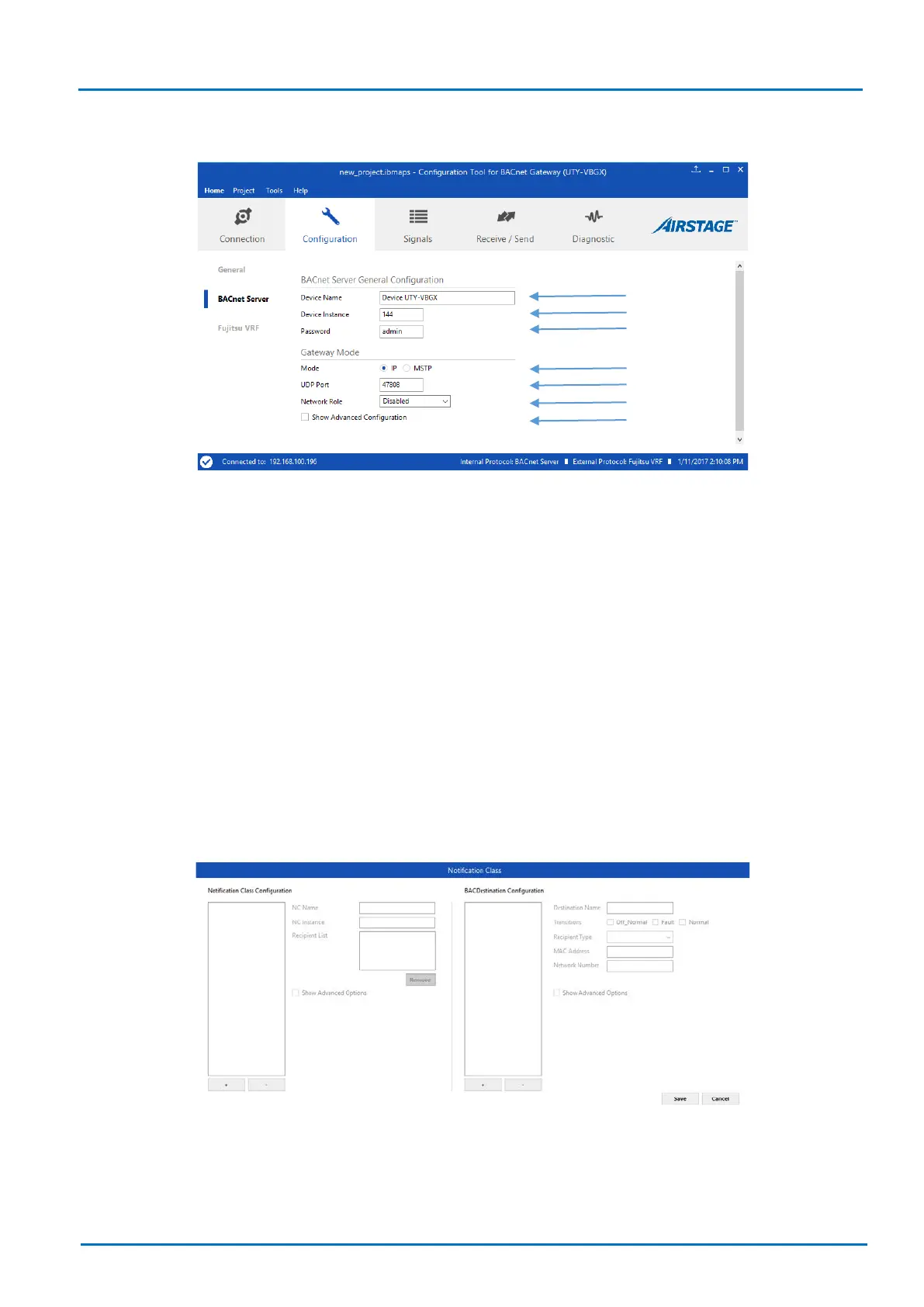
Figure 8.5 BACnet/IP interface configuration
1. Device Name: Device BACnet name and description (Device UTY-VBGX by default).
2. Device Instance: Device BACnet number (144 by default, if more than one UTY-VBGX is present, this
have to be a unique number for each BACnet Gateway for VRF System).
3. Password: Password to allow IP connection (admin by default).
4. Mode: BACnet IP mode is the only one available.
5. UDP Port: Used port for BACnet IP communications (47808 by default)
6. Network Role: Select the gateway role from a BACnet network device point of view:
a. Disabled
b. Foreign device
c. BBMD
7. Show advanced configuration: Enables Notification Classes configuration.
Figure 8.6 Notification Class configuration
Assign the Notification Class added here to objects in the Signal tab .


 To Next Page