Questions? Please Contact Your Local Manufacturer’s Representative
3-27
SECTION 3 EDR-SOLA-IOM-2022-0216 OPERATION
! WARNING
All information in this manual is for
reference and guidance purposes,
and does not substitute for required
professional training, conduct,
and strict adherence to applicable
jurisdictional/professional codes and
regulations.
Non-Fulton product information is for
reference purposes only. No Fulton
document may substitute for full
review of documentation available
from the component manufacturer.
Once the outdoor temperature source has been established the outdoor reset
option must be enabled. For a lead/lag boiler plant this must be done through
the lead lag master conguration. Return to the conguration screen and scroll
to and select lead lag master conguration. Select the box in the bottom right
hand corner labeled advanced settings. Using the left and right arrow keys scroll
to the screen labeld outdoor reset. Once at the outdoor reset conguration
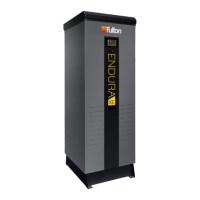
screen select the enable option in the row labeled “enable”. Refer to Figure 65 for
factory default settings:
For a standalone boiler application the outdoor reset must be congured
through a dierent screen. To access this screen start from the boiler status
screen select conguration and scroll to and select outdoor reset conguration.
Follow similar steps as above.
To access the outdoor reset curve select the box labeled show line in the bottom
right hand corner of the outdoor reset conguration screen. The factory default
curve is displayed in Figure 66. There will be two separate curves. The green curve
corresponding to the normal setpoint and the red curve corresponding to the
time of day setpoint. Both curves are a liner interpolation between the minimum
and maximum outdoor temperatures and the normal and time of day setpoints.
The setpoints can be congured through the lead lag master conguration
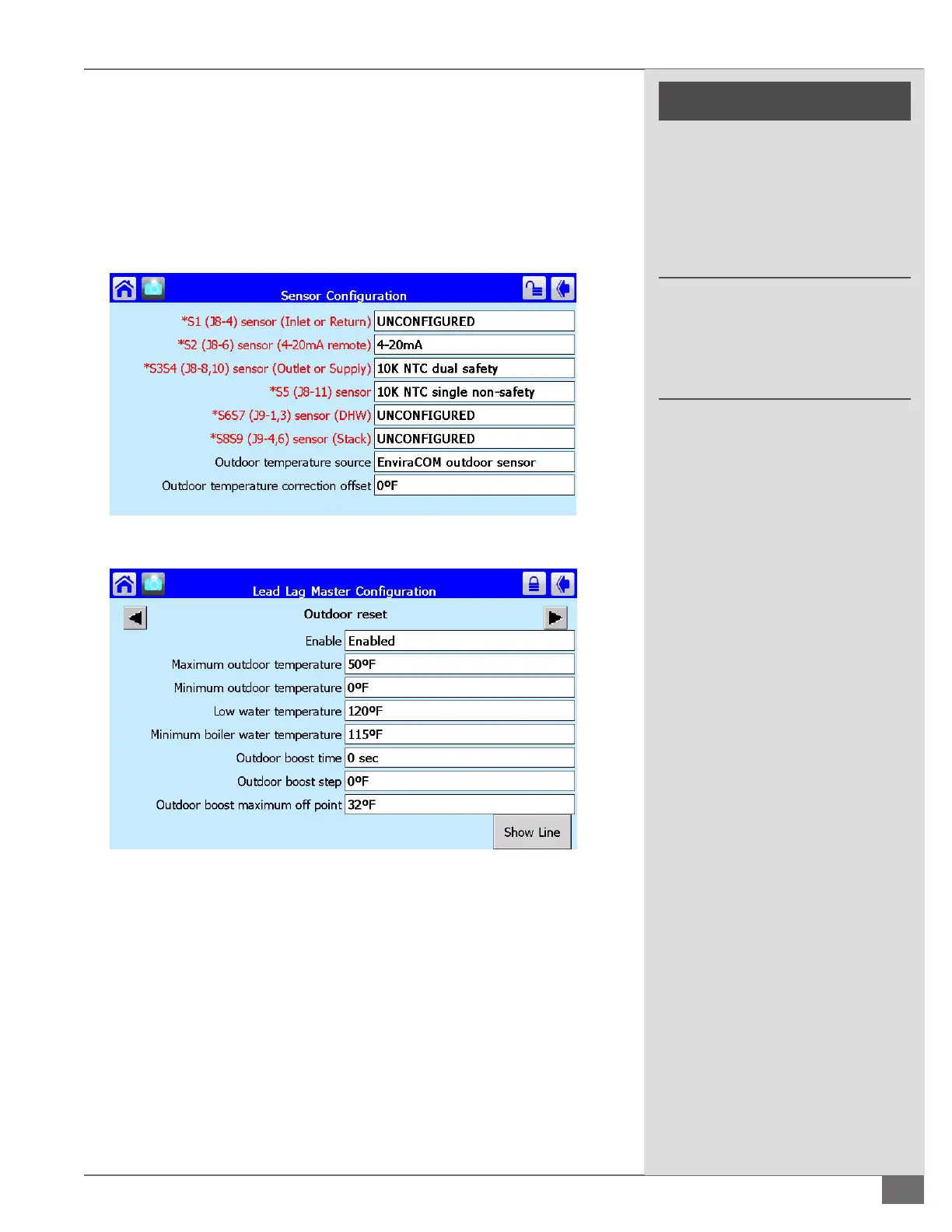
FIGURE 64 OUTDOOR AIR SENSOR CONFIGURATION
FIGURE 65 OUTDOOR RESET CONFIGURATIONS





 To Next Page