2. WIRING
2-19
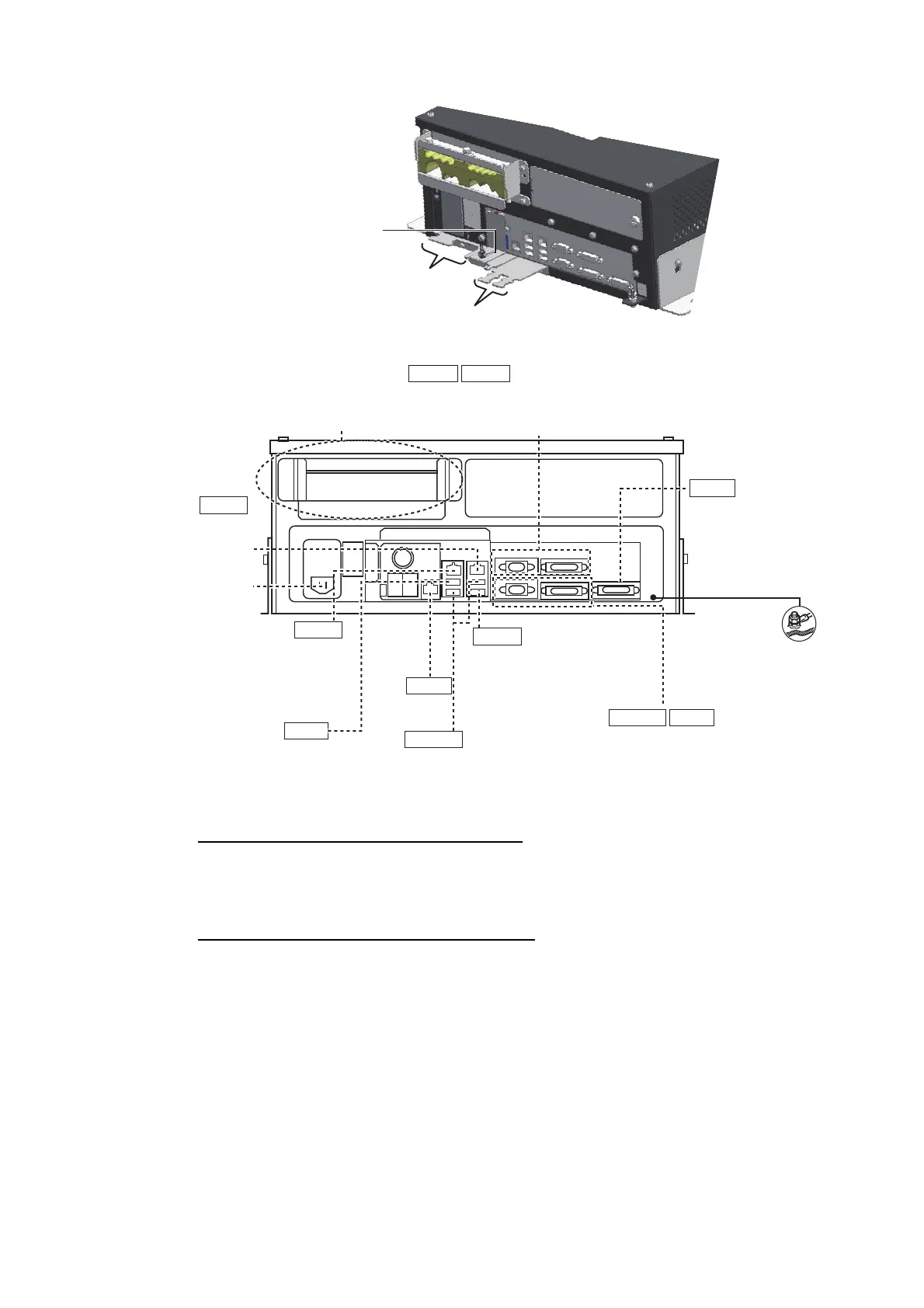
Cables connected at the wiring plate 1
• Power cable (Type: IEC60320-C13-L5M)
• LAN cable to the LAN3 port
Cables connected at wiring plate 2 assy
• USB cables from the control units
• Printer cable
• LAN cable (type: DTI-C5E350 VCV) from the HUB-3000
• LAN cable (type: FR-FTPC-CY) from the HUB-100/MC-3000S
Wiring plate 2 assy
Wiring plate 1
Slide the plate toward
the unit to hide LED
and switches.
MU-190/231
(DVI1: DVI-D/D S-LINK cable,
COM1: DSUB9P-X2-L cable)
COM1
MU-190/231
(DVI3: DVI-D/D S-LINK cable
or DVI-BNCX5-L2000 cable,
COM2: DSUB9P-X2-L cable)
DVI3
USB1
RCU-024/026
(TS-20-071-1 cable)
USB2/3
Optional control unit
RCU-024/026
(TS-20-071-1 cable)
HUB-3000
(DTI-C5E350 VCV
cable)
LAN1
LAN2
HUB-100/MC-3000S
(FR-FTPC-CY cable,
within 50m)
DVI1
COM2
Cable clamp
(See the next page.)
Ground wire
(IV-2sq.,
local supply)
Power cable
(IEC60320-C13-
L5M cable)
USB4
For USB printer
LAN3
Not used.
DVI2 MU-190/231
(DVI2: DVI-D/D
S-LINK cable
or DVI-BNCX5-
L2000 cable)



 To Next Page