5. 3D MODE
5-26
5.13.6 How to set the detection beam display
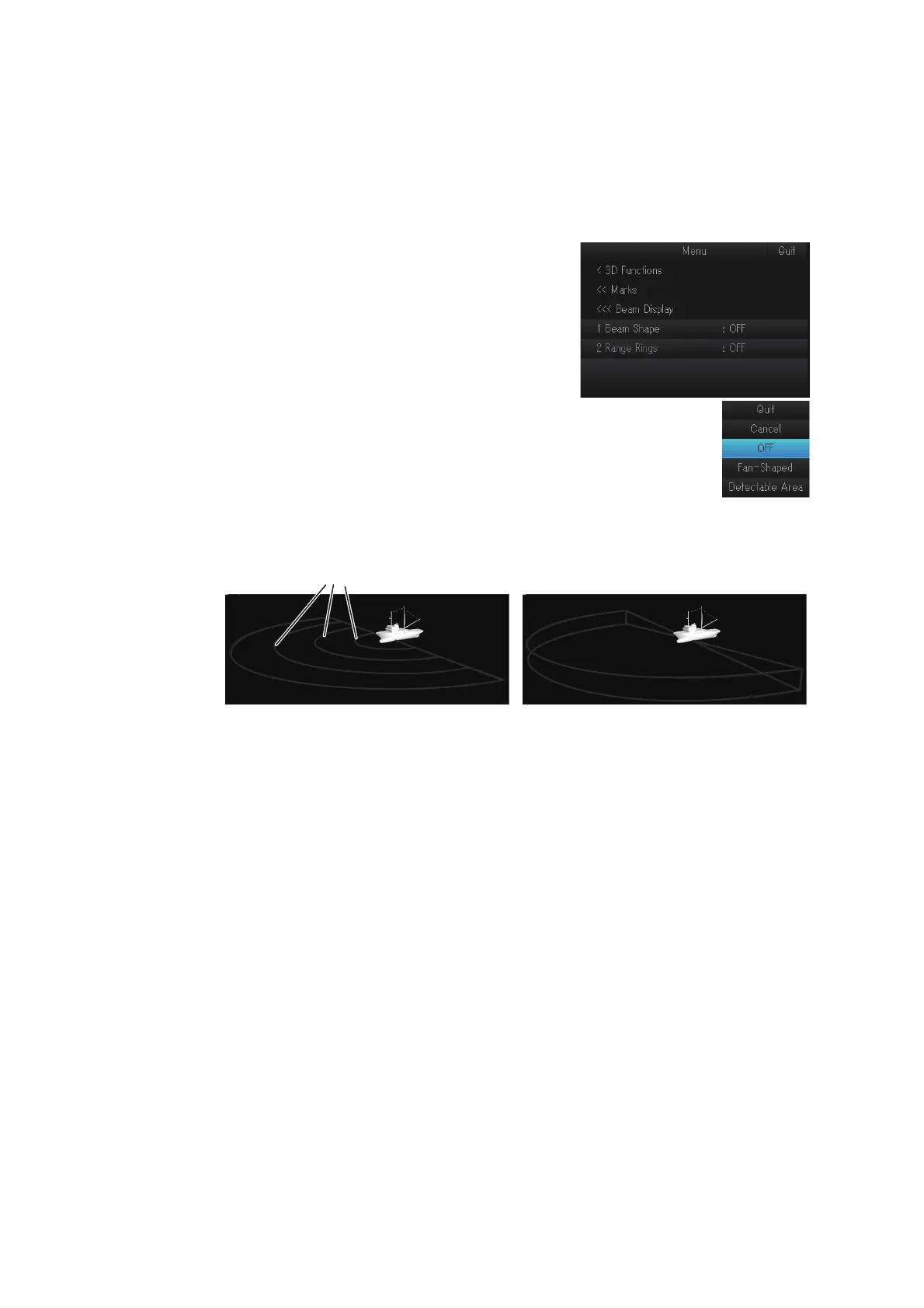
Do as follows to change the detection beam display setting:
1. Open the menu.
2. Select [7 3D Functions], then left-click.
3. Select [6 Marks], then left-click.
4. Select [6 Beam Display], then left-click.
5. Select [1 Beam Shape], then left-click.
6. Select the desired setting, then left-click.
• [OFF]: Hide the detection beam
• [Fan-Shaped]: Show the plane area of the detection beam. You
can show the range rings on the detection beam concentrically.
• [Detectable Area]: Show the stereoscopic area of the detection beam.
7. Select [Quit], then left-click.
8. If you selected [Fan-Shaped] at step 6, select [2 Range Rings], then left-click. For
other settings, go to step 11.
9. Select [ON] or [OFF], then left-click.
Select [ON] to show the range rings on the detection beam.
10. Select [Quit], then left-click.
11. Close the menu.
[Detectable Area]
You can show/hide these range rings from the menu.You can show/hide these range rings from the menu.



 To Next Page