Calibration
5-14
5.2.7 To make a line up procedure
The FV-110 has been tested at the factory and online on a live satellite link to calibrate the
TX polarisation unit. You can fine-tune the TX polarization by doing a line up as
described below. To do the line up, do as follows:
1. Open your Internet browser and enter the IP address of the ACU. The default IP
address is http://192.168.0.1.
2. Create a VSAT modem profile and a satellite profile using the previously created
VSAT modem profile (See To set up a service profile for calibration on page 5-9).
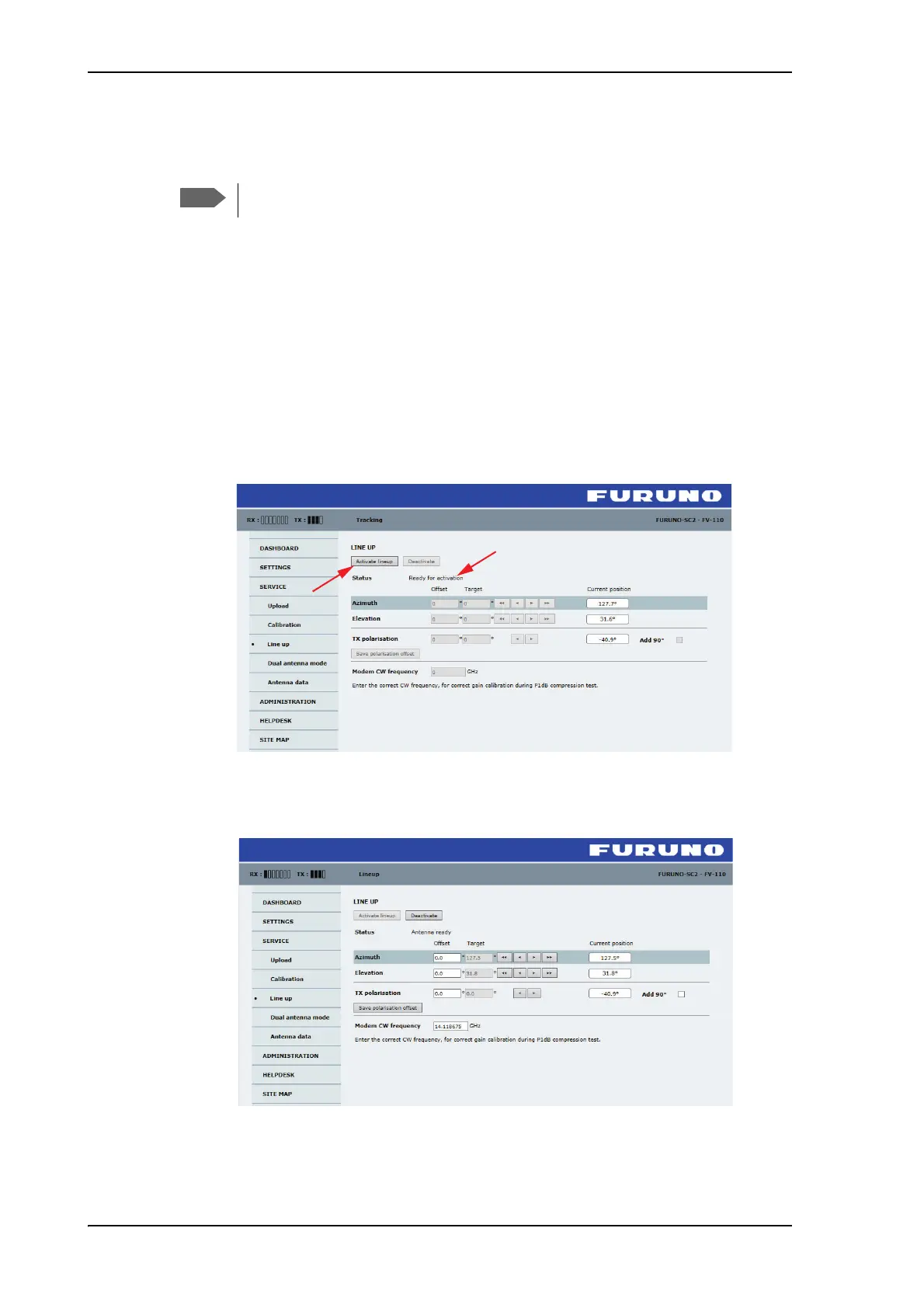
3. Go to the page SERVICE > Line up. As soon as the antenna is in tracking mode and
points to the satellite, the text next to Status shows: Please wait. Improving tracking.
This may take up to 2 minutes. Wait until the text shows: Ready for activation.
Figure 5-11: Web interface: SERVICE, Line up: Ready for activation
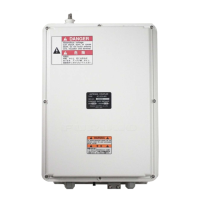
4. Click the button Activate lineup and wait until the status field shows Antenna ready.
Follow the instructions from your service provider.
Figure 5-12: Web interface: SERVICE, Line up: Antenna ready
The ship must not move during the calibration procedure.



 To Next Page