EasyManua.ls Logo

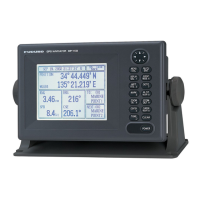
Furuno GP-90 - User Manual

Furuno GP-90
99 pages
Print Icon
To Next Page IconTo Next Page
Loading...
GPS NAVIGATOR
GP-90

Table of Contents

Other manuals for Furuno GP-90

Questions and Answers

  • B
    Brian MoyerAug 1, 2025
    Why is my Furuno GP-90 position wrong?
    • A
      Amy SantosAug 1, 2025
      If the Furuno GPS position is wrong, first check if the correct geodetic chart is entered by going to [MENU ESC][9][6]. You can also apply position correction to the GPS position using the same menu path: [MENU ESC][9][6].
  • M
    Michelle ColemanAug 8, 2025
    What to do if Furuno GPS position cannot be fixed?
    • D
      dustinjohnsonAug 8, 2025
      If your Furuno GPS cannot fix a position, check the antenna cable for a tight connection and to ensure there is no water leakage. Also, check if a functional satellite has been disabled by going to [MENU ESC] [9] [6].
  • J
    Joshua ClarkAug 15, 2025
    How to fix Furuno GP-90 GPS data not transmitting to external equipment?
    • M
      Michael ScottAug 15, 2025
      If your Furuno GPS data cannot be transmitted to external equipment, verify the following: * Check if the data format is correct: [MENU ESC][9][3][4][9][5]. * Ensure the Tx interval is not set to '0'. Select a proper interval via [MENU ESC] [9][3][9][4][9][5]. * Confirm appropriate settings on the external equipment. * Check the connections: GP-90 external equipment TD-A RD-A TD-B RD-B.
  • R
    Reginald TorresAug 23, 2025
    How to troubleshoot Furuno GPS when it will not turn on?
    • L
      Lauren MeyerAug 25, 2025
      If you cannot turn on the power to your Furuno GPS, take these steps: * Check the power connector for a tight connection. * Check if the ship’s main power is off. * Check for a blown fuse.

Summary

Safety Instructions

General Safety Precautions

Key warnings and cautions for safe operation, including electrical hazards and proper handling.

Foreword

Product Features

Highlights the main features and capabilities of the FURUNO GP-90 GPS Navigator.

Menu Tree Navigation

Display Setup Options

Configure screen settings like grid tone, course bar, and time mark appearance.

Track and Mark Configuration

Settings for recording tracks, defining mark shapes, and connecting marks.

Alarm Settings Configuration

Customize and enable various navigation and system alarms for safety.

Operational Overview

Control Panel Functions

Detailed explanation of each button and its function on the GP-90 control panel.

Powering the Device On and Off

Step-by-step guide for turning the unit on and off, including startup procedures.

Display Adjustment and Selection

How to adjust display contrast, brilliance, and select various display modes.

Track Management

Display Zoom and Orientation

Adjusting display zoom levels and setting screen orientation (north-up or course-up).

Cursor Operation and Shifting

Using the cursor for navigation and shifting the display view.

Erasing Track Data

Procedures for erasing stored track data from the memory.

Marks and Events

Entering and Erasing Marks

How to inscribe, erase, and select shapes for navigational marks.

Event and MOB Mark Entry

Recording important event positions and Man Overboard (MOB) locations.

Navigation Planning

Waypoint Registration and Editing

Detailed guide on how to register, edit, and delete waypoints for navigation.

Route Planning and Management

Steps for creating, registering, and managing navigation routes consisting of waypoints.

Destination Setting and Navigation

Setting a Navigation Destination

Methods for setting a single or multiple destinations for navigation guidance.

Canceling Navigation Destination

Procedure to cancel the current destination setting and stop navigation.

Display Configuration Options

Customizing Data Display Fields

Selecting and arranging data items to be shown on the navigator's display.

Position Format Selection

Choosing the preferred format for displaying geographical coordinates (Lat/Long, LOPs).

Alarm System Configuration

Arrival and Anchor Watch Alarms

Setting up alarms for approaching destinations and monitoring vessel position at anchor.

Cross Track Error (XTE) Alarm

Configuring an alarm to alert when the vessel deviates from its programmed course.

Speed and Temperature Alarms

Setting alarms for vessel speed and water temperature deviations.

System Menu Settings

GPS Receiver Settings

Adjusting GPS fix mode, satellite data, and smoothing for optimal performance.

Unit Measurement Customization

Setting preferred units for distance, depth, temperature, and altitude.

WAAS;DGPS Configuration

Enabling and configuring WAAS/DGPS for enhanced positioning accuracy.

Maintenance & Troubleshooting

Clearing the Memory

Procedures for clearing GPS and plotter memory for resets or cold starts.

Troubleshooting Common Issues

Guidance for resolving common operational problems and errors.

Diagnostic Tests

Running built-in tests to check hardware components and system functionality.

Technical Specifications

Index of Manual Topics

Declaration of Conformity

Furuno GP-90 Specifications

General IconGeneral
BrandFuruno
ModelGP-90
CategoryGPS
LanguageEnglish

Related product manuals