EasyManua.ls Logo

Furuno GP-170 - User Manual

Furuno GP-170
117 pages
Print Icon
To Next Page IconTo Next Page
Loading...
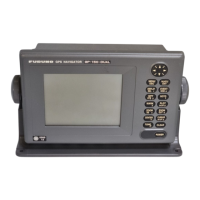
GPS NAVIGATOR
GP-170
OPERATOR'S MANUAL
www.furuno.com
Model

Table of Contents

Other manuals for Furuno GP-170

Questions and Answers

  • D
    Dr. Allison LarsenJul 26, 2025
    What to do if the Furuno GPS position is not fixed?
    • J
      Jessica HernandezJul 26, 2025
      If your Furuno GPS position is not fixed, ensure the antenna connector is securely fastened. Check the number of satellites displayed; if there are two or fewer, check for any obstructions between the antenna and the satellites. You may also clear the GPS memory via the [8 System Setting] - [9 Clear Memory] - [2 Clear GPS] menu.
  • J
    Judith HarperJul 31, 2025
    What to do if Furuno GPS position is wrong?
    • J
      Jared SmithJul 31, 2025
      If your Furuno GPS position is wrong, check that the correct geodetic chart system is selected in the [8 System Setting] - [5 GNSS] - [5 Datum] menu. Alternatively, enter the position offset via the [8 System Setting] - [4 Correction, Offset] - [1 Position Offset] menu.
  • M
    mercadoaprilAug 5, 2025
    Why is Furuno GPS data not transmitting to external equipment?
    • D
      David MontgomeryAug 5, 2025
      If data is not being transmitted from your Furuno GPS to external equipment, verify the data format in the [7 I/O] menu is correct. Also, check that the TX interval isn't set to off; select the appropriate interval. Ensure the settings on the external equipment are correct. Finally, inspect the connections: GP-170 External equipment TD4-A RD4-A TD4-B RD4-B.
  • S
    Sandra PottsAug 10, 2025
    Why is the bearing wrong on my Furuno GPS?
    • M
      Matthew CooperAug 10, 2025
      If your Furuno GPS bearing is wrong, check the magnetic variation on the [8 System Setting] - [2 Plotter] - [2 Magnetic Variation] menu.
  • Y
    Yolanda RiggsAug 16, 2025
    How to fix a Furuno GPS that you cannot turn on?
    • M
      Mark FoxAug 16, 2025
      If your Furuno GPS won't turn on, check the power cable and connector for any damage. Ensure the power cable is firmly fastened. Verify the battery provides the proper voltage output. Also, check if the fuse in the power cable has blown.
  • N
    Nancy MitchellAug 21, 2025
    What to do if Furuno GPS keys are not responding?
    • S
      Shannon OwensAug 21, 2025
      If there is no response when a key is pressed on your Furuno GPS, turn the power off and on. If the problem persists, ask your dealer.

Summary

Safety Instructions and Precautions

1. Operational Overview

1.1 Control Panel and Key Functions

Details the arrangement and function of operation and function keys on the control panel.

1.2 Power On;Off Procedure

Step-by-step guide to turn the GP-170 unit on and off.

1.5 Navigating the Main Menu Structure

Describes the main menu hierarchy and how to navigate through its layers.

2. Plotter Display Overview and Track Management

2.1 Display Settings and Customization

Covers setting background color, zoom, orientation, and other display parameters.

2.3 Track Recording and Management

Details how to start/stop track recording and set plotting intervals.

3. Marks and Waypoint Management

3.1 Entering Marks on the Plotter Display

Guide to preset mark appearance (shape, color, line) and enter marks.

3.2 Event Mark Entry and Configuration

Instructions for presetting event mark appearance and entering event marks.

3.3 Man Overboard (MOB) Mark Placement

Describes how to place a MOB mark for rescue assistance and its function.

3.4 Editing Marks and Event Marks

Covers editing name, position, shape, and color of marks and event marks.

3.5 Erasing Marks and Event Marks

Procedures for erasing individual or all marks and event marks.

4. Routes and Navigation Planning

4.1 Creating and Setting Up Routes

Guidance on creating new routes, presetting route settings, and defining waypoints.

4.2 Editing and Managing Routes

Instructions for editing route names, colors, and waypoints within a route.

5. Destination Setting and Navigation

5.1 Setting a Destination

Methods for setting a destination using cursor, waypoint, mark, or route.

8. Alerts and Warning System

8.1 Overview of Alert Types

Lists and describes the types of alerts, including warnings and cautions, generated by the system.

10. Maintenance and Troubleshooting

10.2 Fuse Replacement and Troubleshooting Guide

Procedures for replacing fuses and basic troubleshooting steps for common issues.

10.5 Performing Self Tests

Running memory, keyboard, and LCD tests to diagnose potential issues.

Specifications of the GPS Navigator GP-170

1. GPS Receiver Specifications

Technical details on receiving frequency, tracking code, channels, and accuracy.

Furuno GP-170 Specifications

General IconGeneral
Display Size5.7 inches
Waypoints10, 000
Display TypeColor LCD
Position Accuracy3 meters
Receiver Type12-channel
SBASWAAS
DisplayColor
Display ModesDay/Night
InterfaceNMEA 0183

Related product manuals