4-1
4. ROUTES
To navigate from one place to another, several course changes are required. The
point for course change is called a waypoint. The sequence of waypoints (marks for
course changes) leading to the last destination is called a route.
4.1 How to Create a Route
A maximum of 99 routes can be created and a route can have a maximum of 1,000
waypoints.
4.1.1 How to preset the settings for routes
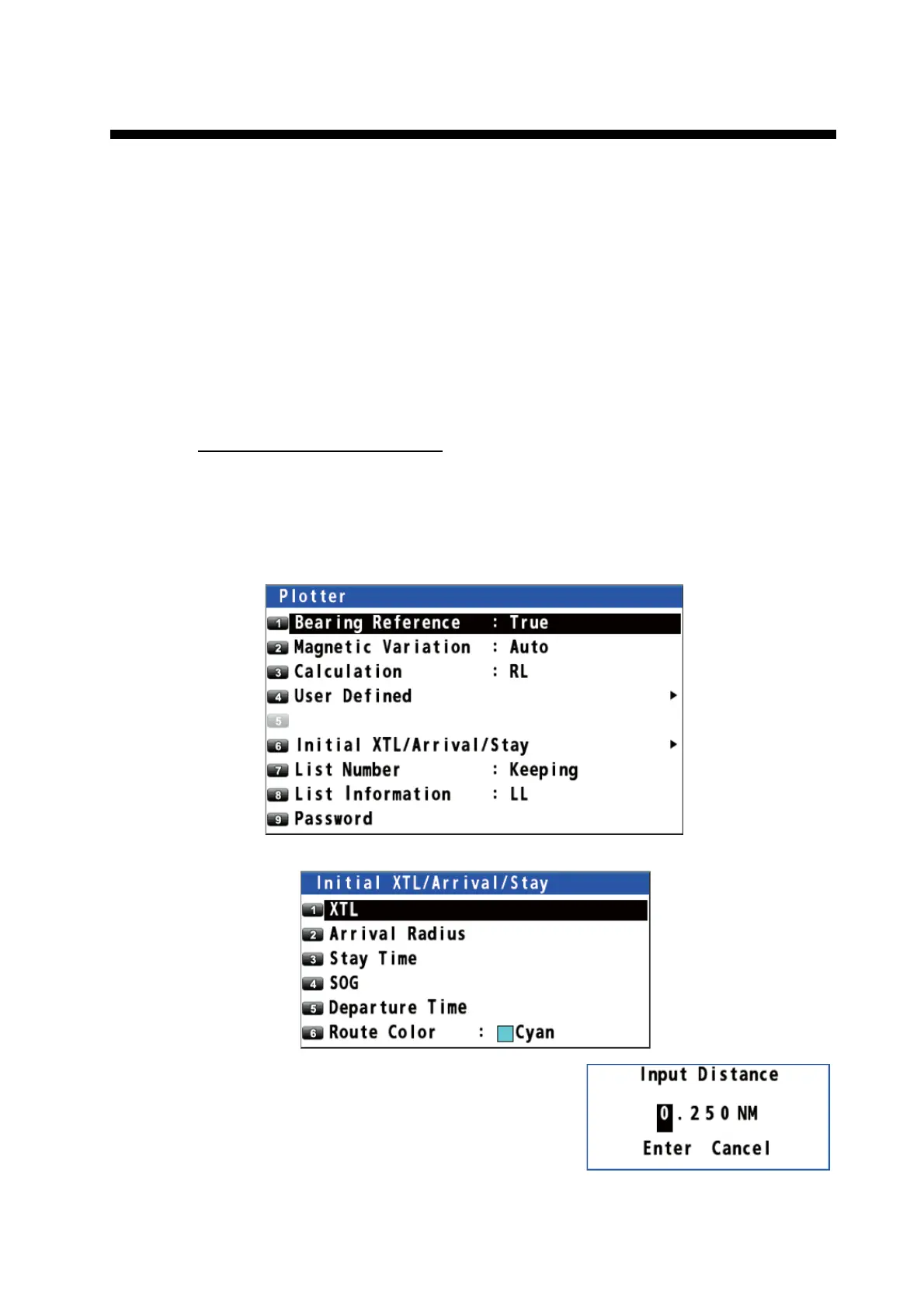
XTL (Cross-track limit) range
The XTL range is the maximum distance your boat is allowed to go off course before
the XTE notice (see section 6.3) is given.
1. Press the MENU/ESC key to open the main menu.
2. Select [8 System Setting] then [2 Plotter].
3. Select [6 Initial XTL/Arrival/Stay].
4. Select [1 XTL].
5. Enter the XTL distance with the numeric keys
(setting range: 0.001 to 9.999 NM).
6. Move the cursor to [Enter] then press the NU/
CU ENT key.
7. Press the MENU/ESC key to close the main menu.



 To Next Page
 Loading...










