126
Function
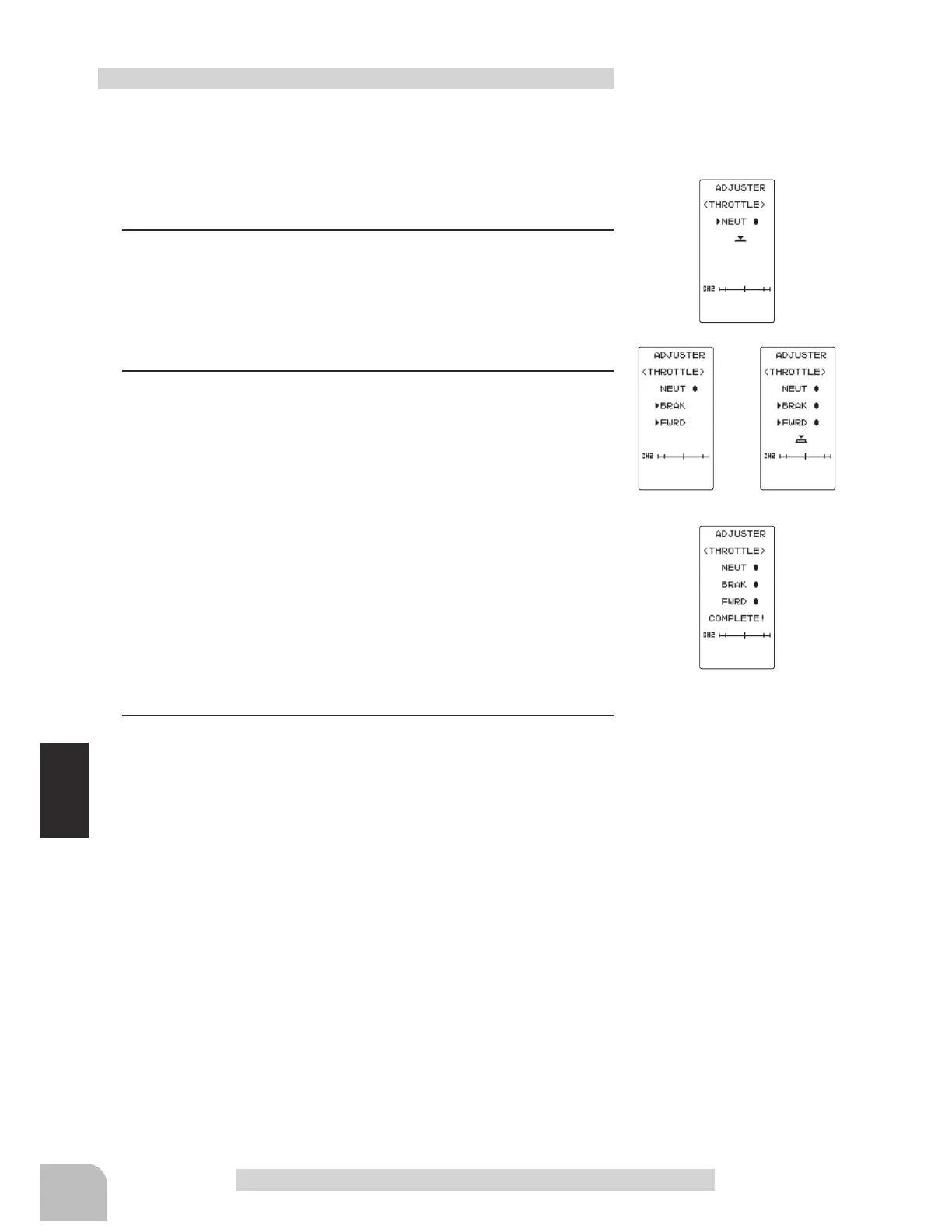
fig-1
fig-2 fig-3
fig-4
Adjuster "ADJUSTER"
(Preparation)
On the ADJUSTER screen, select the setting item "THROT-
TLE" by moving the (JOG) button up or down, and press the
(JOG) button.
1
(Throttle neutral adjustment)
In the neutral setup screen (fig-1) state, lightly pull the throttle
trigger and then press the (JOG) button in without touching the
trigger.
2
(Throttle throw adjustment)
In the throw setup screen state (fig-2), lightly operate the trig-
ger fully to the brake side and the forward side and when but-
ton mark (fig-3) is displayed, press the (JOG) button.
Internal check is performed automatically. When each adjust-
ment point is within a fixed range, correction is performed and
"COMPLETE!" (fig-4) is displayed.
If an adjustment point is not within a fixed range, correction is
not performed and the correction data is not updated.
When button mark is not displayed even though correction was
performed again, please contact a Futaba Radio Control Cus-
tomer Center.
3
When finished with the setting, return to the ADJUSTER
screen by pressing the (END) button.
Throttle adjustment



 To Next Page