12
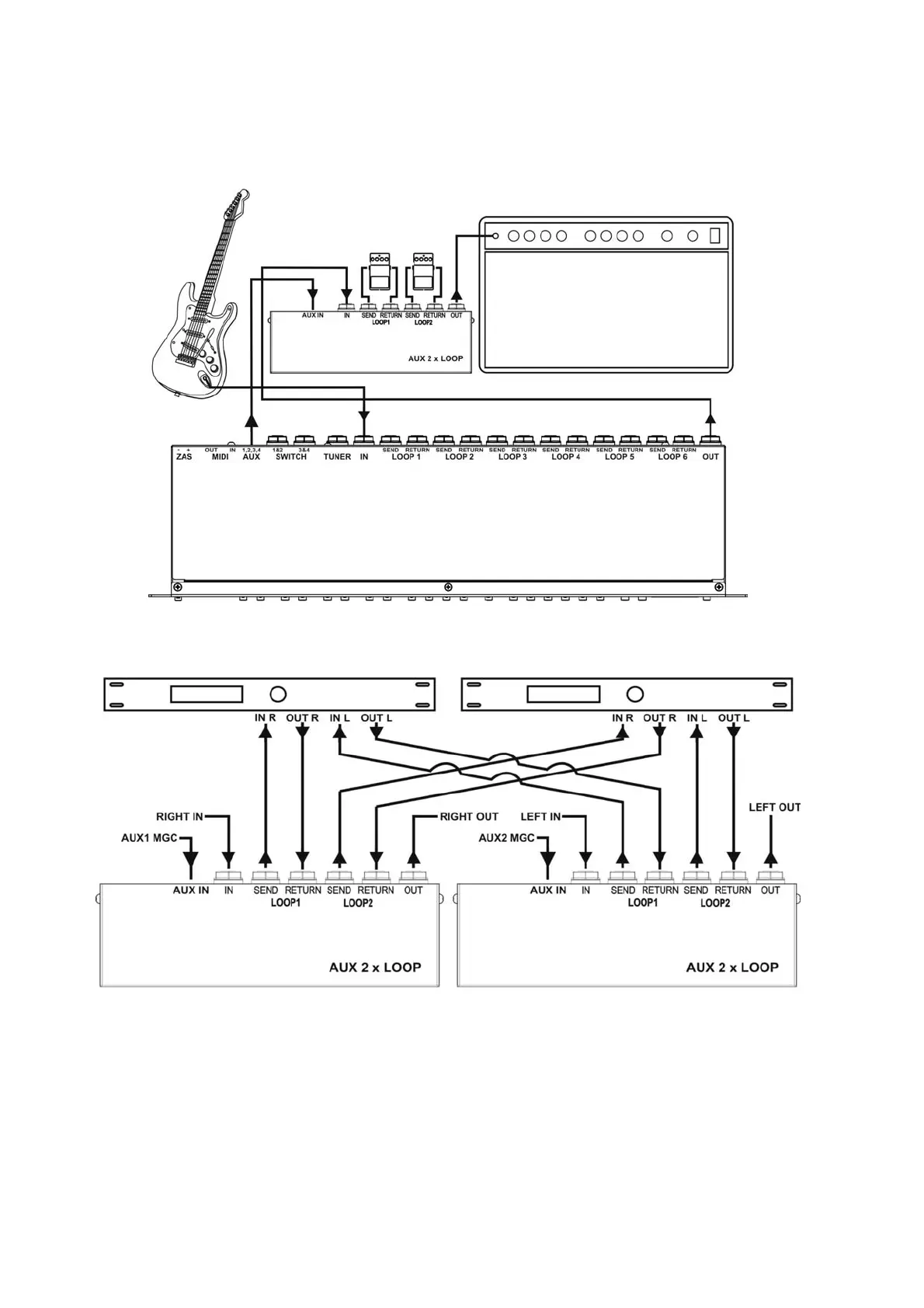
6. For switching the loops serve the corresponding buttons of AUXILIARY SECTION (for AUX 1 buttons 1
and 2, for AUX 2 buttons 3 and 4, AUX 3 buttons 5 and 6 and for AUX 4 buttons 7 and 8).
It is possible to connect four AUX 2xLOOPs to one MGC-6 maximally.
Below you will find the example of AUX 2 X LOOP connection.
Extending the MGC by two effect loops.
Two stereo effects switch (TRUE BYPASS)
AUX A/B SWITCH connection
AUX A/B SWITCH enables switching two different signal sources to one OUTPUT. Connection of the
devices should be done by the cable supplied to AUX A/B SWITCH. With this cable we connect AUX IN
AUX A/B SWITCH connector with one of the AUX1-4 connectors of the MGC-6. For switching the AUX A/B
SWITCH serve the corresponding button of AUXILIARY SECTION.
It is possible to connect the second AUX A/B SWITCH to the one already connected to the MGC-6.


 To Next Page