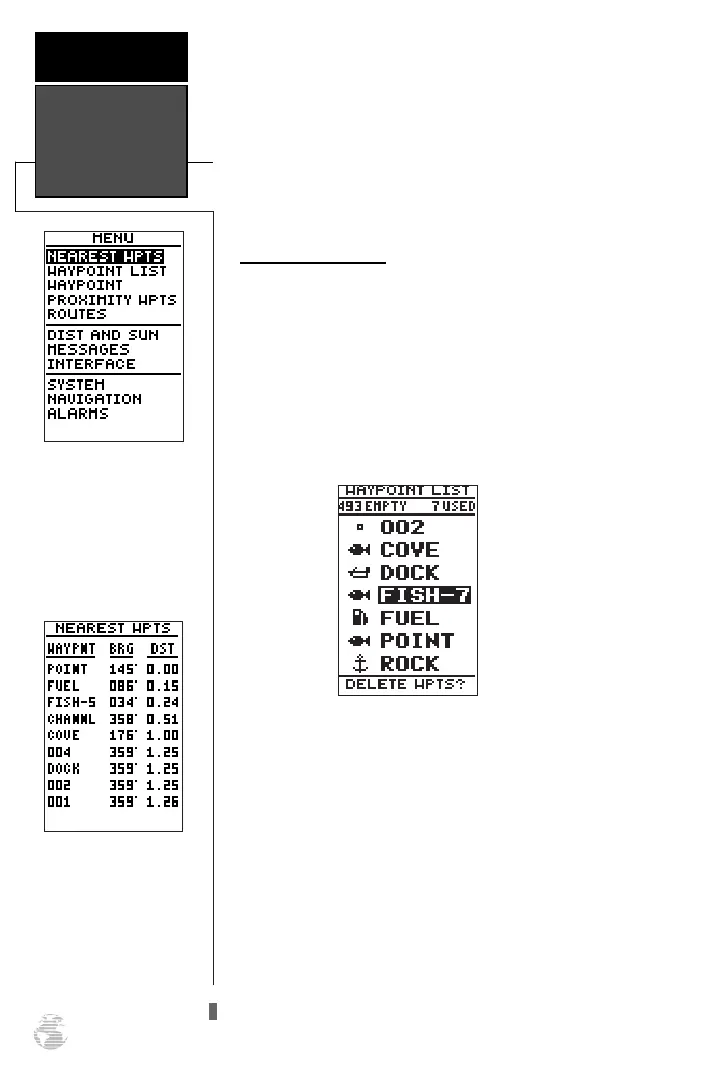
To return to the nearest waypoint page:
1. Highlight ‘DONE?’.
2. Press
F
.
To go to a highlighted list waypoint:
1. Highlight the desired waypoint, and press
G
.
2. Press
F
.
Waypoint List Page
The waypoint list page provides a complete list of
all waypoints currently stored in the GPS 126/128 and
their respective waypoint symbols. The total number of
empty and used waypoints is also indicated. From the
waypoint list page, you can retrieve a waypoint defini-
tion page, delete all user-defined waypoints, delete way-
points by symbol, review a waypoint, or GOTO to a
selected waypoint.
To delete all user-defined waypoints:
1. Highlight ‘DELETE WPTS?’, and press
F
.
An options page will appear, asking if you want to
delete all user-defined waypoints or if you want to
delete waypoints by symbol type.
1. Highlight either ‘ALL’ or ‘SYMBOL’, and press
F
.
If you select ‘ALL,’ highlight ‘YES?’ and press
F
to confirm.
Nearest
Waypoints &
Waypoint List
REFERENCE
20
To select a waypoint sub-
menu, highlight the
desired option and press
ENTER.
Nearest Waypoints
Page
The compass heading
(BRG) and distance
(DST) to the nine nearest
waypoints are updated
continuously.
126/128 Manual (new) 6/15/98 9:51 AM Page 20









 To Next Page