Using the Navigation Pages
Once you’ve selected a GOTO destination or acti-
vated a TracBack, MOB, or Route, the GPS 126/128
will provide graphic steering guidance to the destina-
tion with one of two navigation pages:
•The
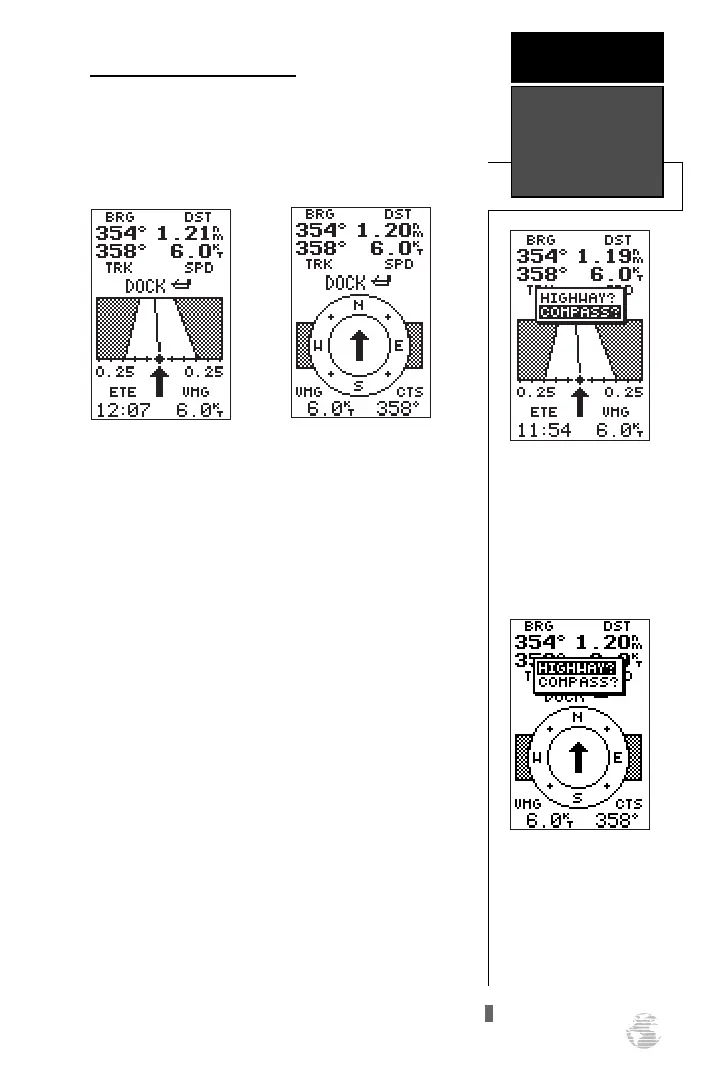
Highway Page
(default) provides a graphic
highway that shows your movement relative to the
desired course, with an emphasis on your
crosstrack error (the distance and direction you
are off course). This page also features a course
deviation indicator (CDI) (see pg. 35). The
Highway Page is well-suited for water or off-road
recreation where straight-line navigation is possi-
ble.
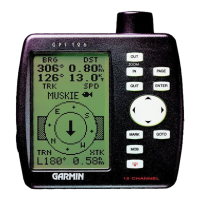
•The
Compass Page
provides a directional point-
er to the destination, with a rotating compass dis-
play to show your direction of travel. The
Compass Page provides better steering guidance at
slow speeds with many changes in direction,
where straight-line navigation is not possible.
Both pages provide a digital display of the bearing
and distance to the destination, and your current speed
and track over the ground. You can switch to either
Navigation Page at any time.
To select either Navigation Page:
1. Press
F
from the existing Navigation Page, and
F
again to change the page.
33
To switch the navigation
page to the Compass
Page, press ENTER twice.
REFERENCE
Navigation
Pages
To switch the navigation
page to the Highway Page,
press ENTER twice.
Highway Page
Compass Page
126/128 Manual (new) 6/15/98 9:51 AM Page 33









 To Next Page