Alarms Setup
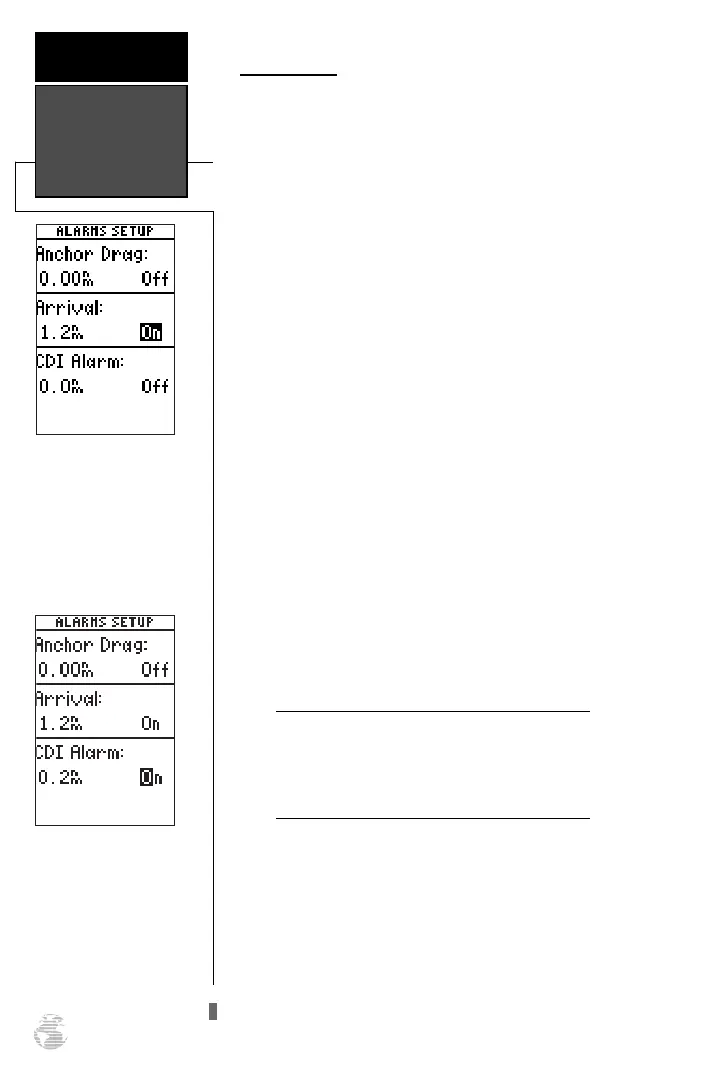
The alarms setup page is used to set the three
alarms available on the GPS 126/128: the anchor drag
alarm, arrival alarm, and CDI alarm.
The anchor drag alarm will sound if your boat has
moved outside a range measured from a central point
(your position). The arrival alarm sounds when you are
approaching a waypoint and have reached the user
defined distance. The CDI alarm will alert you when
your track varies from the shortest distance to a way-
point by the defined range.
The arrival and CDI alarms may be set from 0.0 to
9.9 units. The anchor drag alarm may be set up to 9.99
distance units.
To set the alarms:
1. Move the highlight to ‘ALARMS SETUP’ and press
F
.
2. Select the desired alarm distance field and press
F
.
3. Enter the distance for the alarm and press
F
.
4. If you would like to change the ‘On/Off’ setting, press
the
F
key and use the
U
and
D
keys to turn
the alarm on or off.
5. Enter a setting and press the
F
key.
When setting the anchor drag alarm, remember
that Selective Availability can degrade your
GPS position as much as 100 meters and may
cause false anchor drag alerts.
Alarms Setup
REFERENCE
50
When activated, the arrival
alarm will sound when you
reach the specified distance
from your destination
waypoint.
Use the CDI alarm to
ensure you maintain a
straight-line course to the
destination waypoint.
!
#
126/128 Manual (new) 6/15/98 9:51 AM Page 50









 To Next Page