12 Navus 2 Owner’s Manual
uSInG the MaIn PaGeS
E
N
uSING thE MaIN PaGES
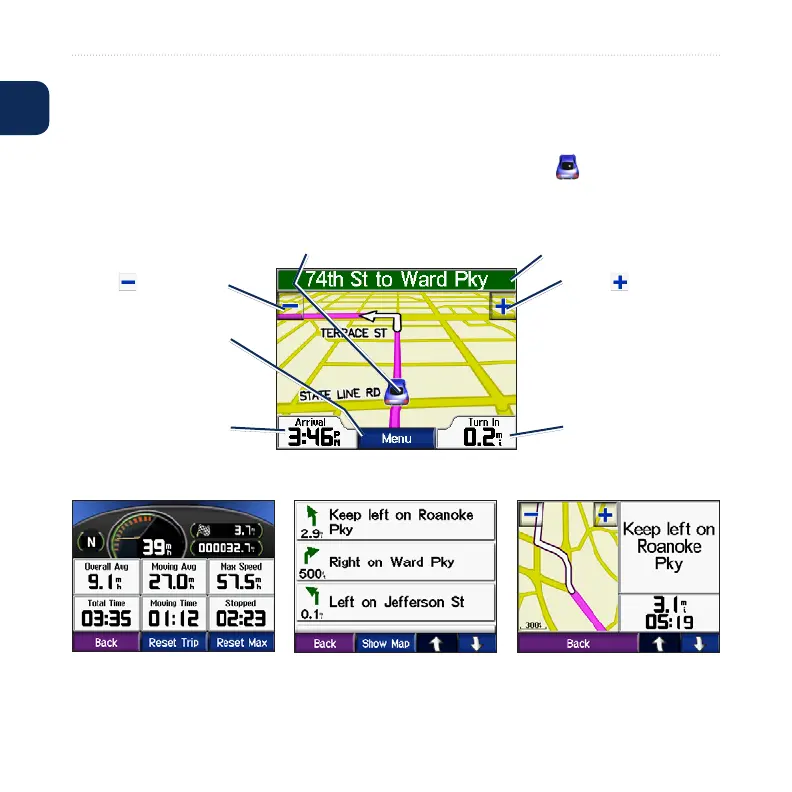
Map Page
On the Menu page, touch View map to open the Map page. The vehicle icon
shows your current location.
Map Page while Navigating a Route
Touch Arrival or
Speed to open the
Trip Information page.
Touch Turn In to open
the Next Turn page.
Touch the text bar to open
the Turn List page.
Touch to zoom out. Touch to zoom in.
Touch Menu to return
to the Menu page.
To save your current location, touch
the vehicle icon, and touch Yes.
Turn List Page Next Turn PageTrip Information Page











 To Next Page