Navus 2 Owner’s Manual 1
GettInG Started
E
N
GEttING StartEd
What’s Included
Navus 2 unit
USB cable to connect the Navus 2 to your computer. Your Navus 2 connects to your
computer as a mass storage device (see page 14).
Yellow Sheet that contains your unit’s serial number, registration number for
registering on Garmin’s Web site, and unlock code for future reference.
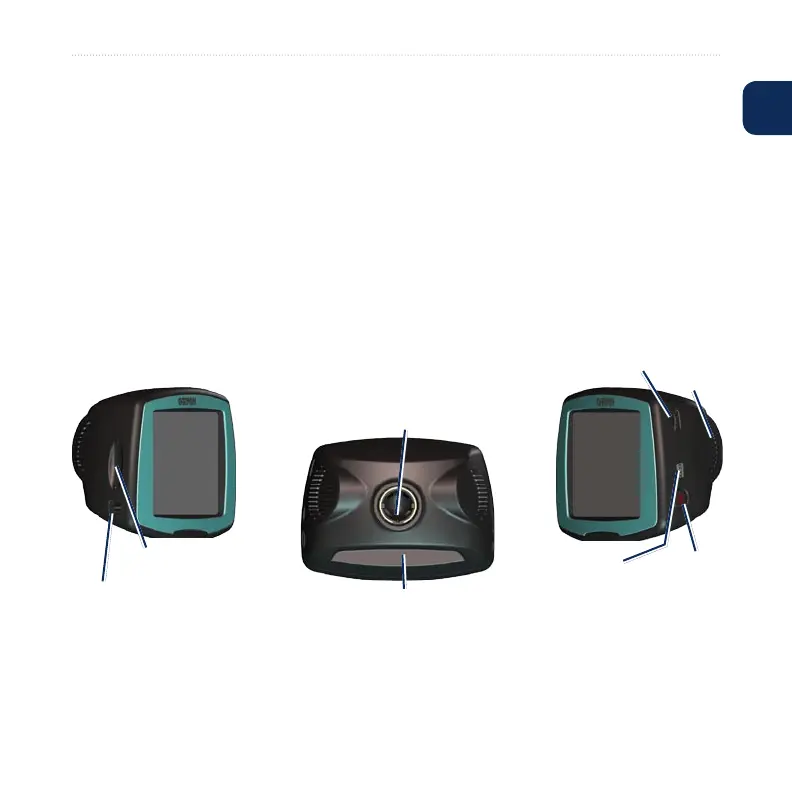
Looking at Your Navus 2
SD card slot
MCX connector under rubber cap
(for an optional external antenna)
Power
button
Volume knob
Mini-USB
connector
Power
connector
Ball socket (for attaching
to the mount)
Speaker










 To Next Page