14 Navus 2 Owner’s Manual
ManaGInG FIleS on Your navuS 2
E
N
MaNaGING FIlES oN Your
NavuS 2
Youcanstoreles,suchasJPEGimage
les,intheNavus2’sinternalmemory
or on an optional SD card.
NOTE: The Navus 2 is not
compatible with Windows
®
95,
Windows 98, or Windows Me
operating systems. This is a common
limitation of most USB mass storage
devices.
Supported File Types
• GPIcustomPOIlesfromGarmin’s
POI Loader (see page 25)
• GPXwaypointlesfromGarmin’s
MapSource
®
(see page 24)
• Maps from MapSource
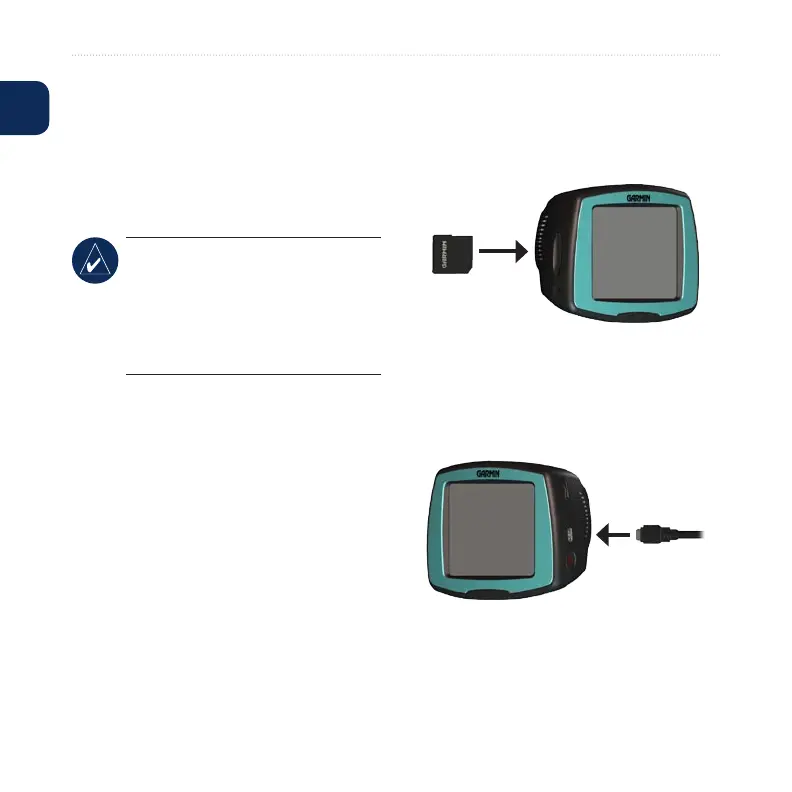
Step 1: Insert an SD Card
(Optional)
To insert or remove the card, press it in
until it clicks.
Step 2: Connect the USB
Cable
1. Plug the small end of the USB cable
into the mini-USB connector.
2. Connect the larger end of the USB
cable to an available USB port on
your computer.











 To Next Page