iQue
™
3600
GPS Applications
25
Using Waypoints
Moving a
waypoint on
the Map
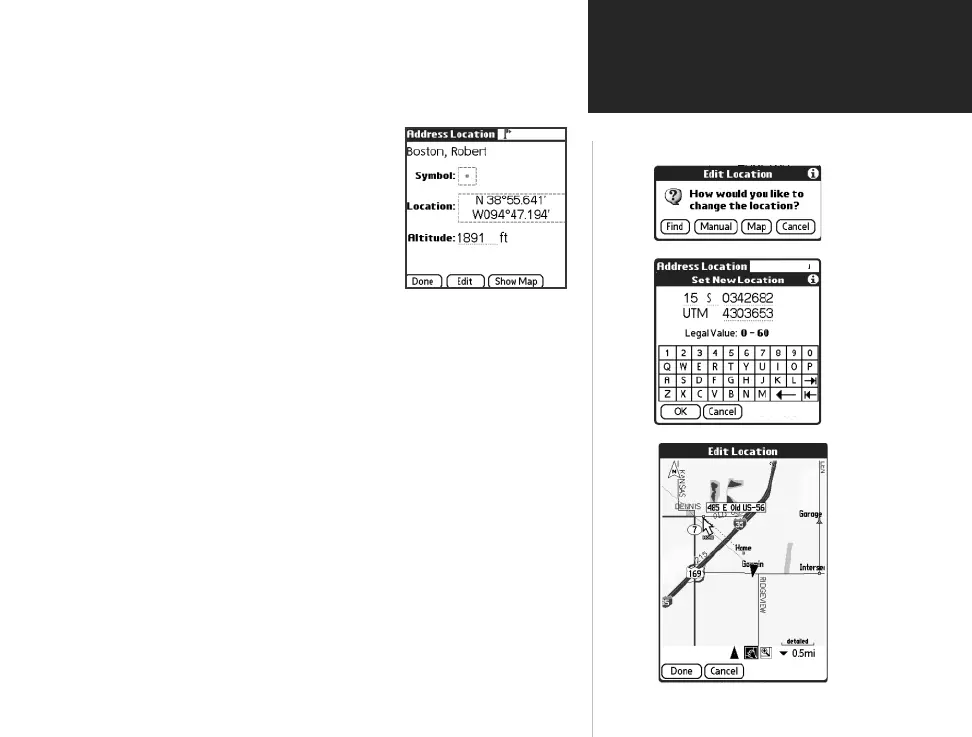
Edit Location
Options
Moving a way-
point by setting
new position
coordinates
To change the location of a waypoint:
1.
Access the waypoint you want to move, from the Address Book.
2. Once a waypoint has been identifi ed, tap
it to display the Address View page and
then tap the Location button to display
the Address Location page.
3. Observe that the “Map” option at the top
of the page. Tap it to display the Details
option and then tap the Details option to
display the details page for that waypoint.
4. Tap the information contained in the dotted box around the Location
information to display the “Edit Location“ window.
5. You have three methods in which to change the waypoint location:
• Tap the Find button to use QueFind to fi nd a location for the
waypoint.
• Tap the Manual button to enter new location coordinates
using the Graffi ti
®
2 input area. The “Legal Value” text will
indicate the range of numbers or letters that are allowed for
each fi eld of the current location format.
• Tap the Map button to display the Map page which will allow
you to tap anywhere on the map and designate it as the new
location. A dotted line will connect the new location with the
old and the word “MOVE” will appear below the map pointer.
Tap done to complete the move.
QueApplicationsGuideFinal.indd 35 6/23/2003, 3:18:26 PM



 To Next Page