iQue
™
3600
GPS Applications
36
Using QueRoutes
Routing Preferences
Guidance Preferences
Route and Guidance Preferences
You can control the way a route is calculated and select the type of
route guidance prompts. When you set preferences for an individual
route, all other routes will reflect those preferences.
To Set Routing Preferences:
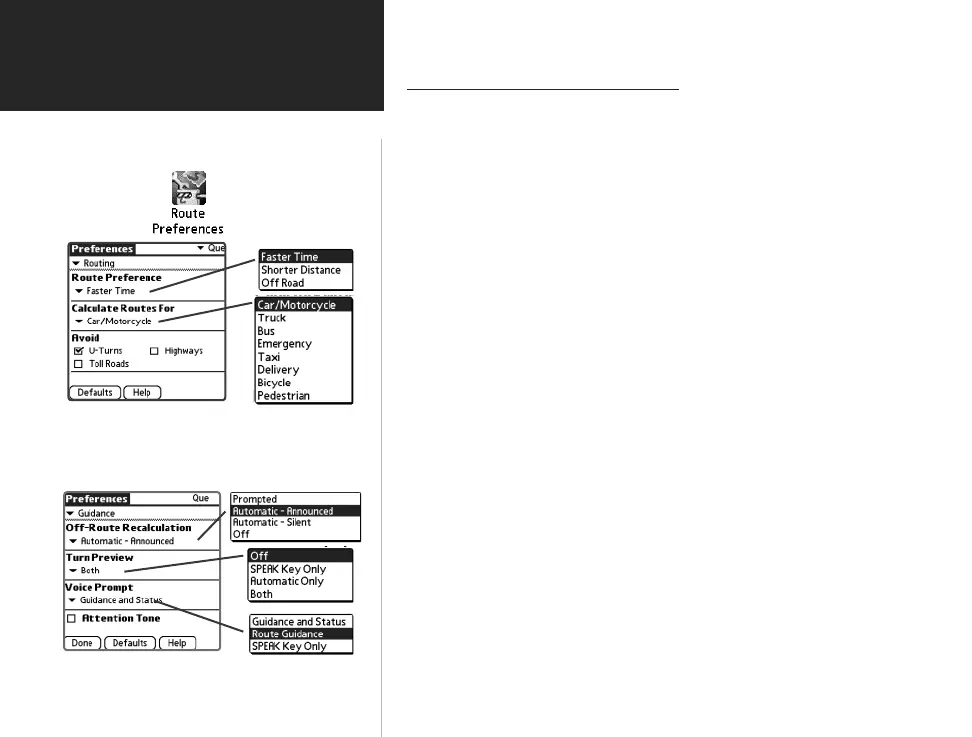
1. Tap the Route icon to display the QueRoutes dialog box.
2. Tap the Route Preferences icon to display ▼ Routing preferences.
3. Tap the ▼ icon beneath the “Route Preference” option to display
and select from three options. The “Off Road” option will generate a
straight line to your destination, not following roads.
4. Tap the ▼ icon beneath the “Calculate Routes For:“ option to
display and select from a list of transportation options.
5. Tap the box next to the “Avoid” options to toggle a check mark and
active that option.
To Set Guidance Preferences:
1. Tap the Route icon to display the QueRoutes dialog box.
2. Tap the Route Preferences icon to display the Que Preferences
page. Tap the ▼ icon preceeding the Routing option to display the
list of other options. Select ▼ Guidance.
3. Tap the ▼ icon beneath the “Off-Route Recalculation” option to
display and select from four options for recalculation notifi cation.
4. Tap the ▼ icon beneath the “Turn Preview“ option to
display and select from a list of methods for turn notifi cation.
5. Tap the ▼ icon beneath “Voice Prompt” to select voice guidance.
6. Toggle the “Attention Tone” box for indication of route changes.
QueApplicationsGuideFinal.indd 46 6/23/2003, 3:18:37 PM



 To Next Page