iQue
™
3600
GPS Applications
37
Using QueRoutes
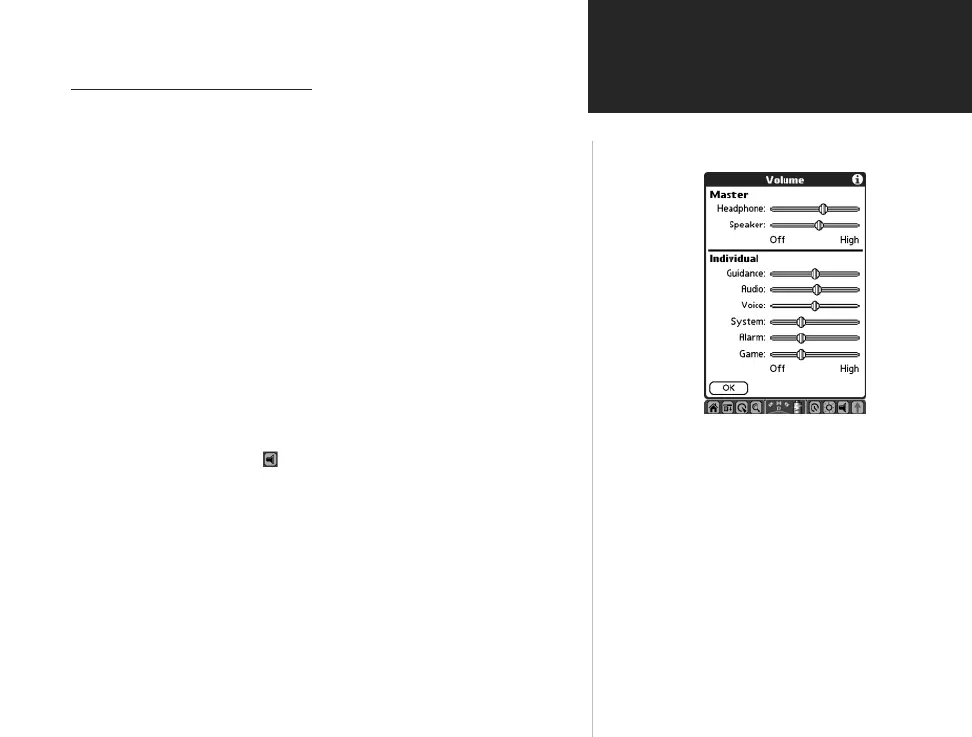
Volume Adjustment Page
Using Routing Voice Prompts
Once you have created a route to a destination you can begin
navigation. In addition to a graphic in the QueMap application and
“pop-up” turn displays you will be given voice prompts prior to turns
and points on your route.
To adjust voice prompt volume:
While navigating a route, you may need to adjust the volume to
compensate for road noise, etc.
If you’re using the Auto Navigation Kit with remote speaker:
1. Adjust the volume as desired by turning the volume control located
on the side of the Remote Speaker.
If you’re using the iQue handheld with battery power:
1. Tap the Volume icon at the bottom of the display to open the
Volume Control Page.
2. Use the stylus to adjust the Guidance volume slider to a level appro-
priate for the noise environment.
3. Tap OK when completed.
QueApplicationsGuideFinal.indd 47 6/23/2003, 3:18:38 PM



 To Next Page