iQue
™
3600
38
GPS Applications
Using QueTurns
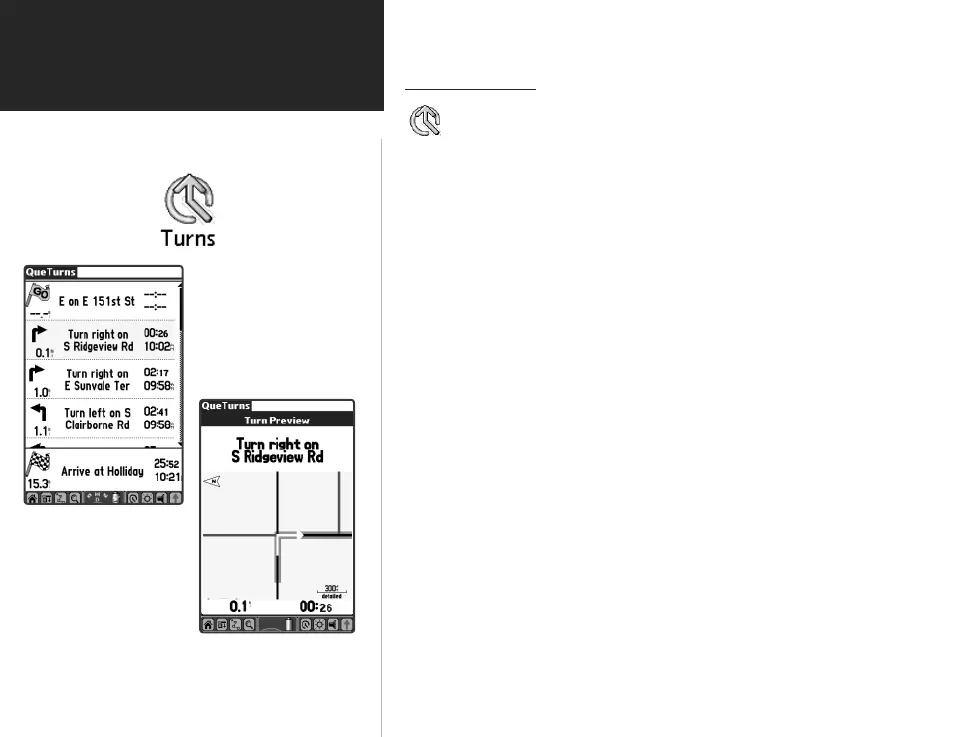
Turn Preview Page
Turns List
Using QueTurns
QueTurns is an application that can show you a list of turn-by-
turn directions to a destination. The application is active only
when a route is active.
Use QueTurns to:
• View turns on a route in order.
• View the Turn Preview for an individual turn.
To open the QueTurns Application:
1. Tap the Applications Launcher icon to display the QueTurns
icon, then tap the QueTurns icon to display the Turns Page.
2. Or, press the Que Hard Button when a route is active.
3. If you are actively navigating a route, a list of turns, in order, will
be displayed.
4. Each turn entry provides a direction arrow showing the direction you
will turn and the distance to that turn, plus written instructions.
The time to the next turn is displayed at the top right of each turn
entry and the time of day which you will reach that turn is displayed
at the lower right of each turn.
5. Tap a turn on the list to display it on the Turn Preview Page.
QueApplicationsGuideFinal.indd 48 6/23/2003, 3:18:39 PM



 To Next Page