iQue
™
3600
Audio Applications
47
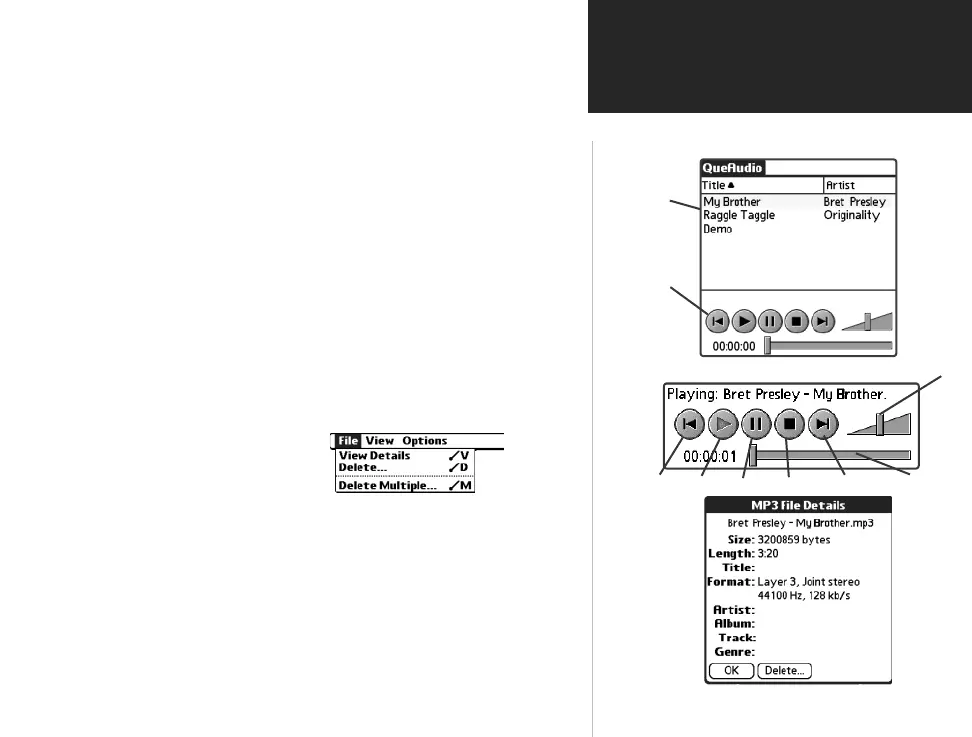
Using QueAudio
QueAudio Page
Play
Controls
List of File
Titles
Audio File
Detail Page
Rewind Play Pause Stop Fast Forward Track Slider
Volume
To play files using QueAudio:
1. With the QueAudio application displayed, tap the desired fi le title to high-
light it.
2. Then tap the Play button on the control panel below.
You may also select fi les by rotating the Thumb Wheel up or down and
pressing in to toggle between play and pause.
3. To listen to a particular section of a fi le track, use the stylus to position the
Track Slider to select a desired portion of the track.
To view details about selected files:
1. Highlight the desired fi le from the list on the QueAudio page.
2. Tap the QueAudio menu icon at the top of the page to display the
fi le menu items.
3. Tap the View Details option to display the details page for the
highlighted fi le.
To delete selected files:
1. Tap the QueAudio options tab and select Delete to remove the
highlighted fi le from the external card...or tap Delete Multiple to
remove several selected fi les from the external card.
To change the order of files in the list:
1. Tap the column title to cycle the sorting order. To shuffl e the order,
tap the column title until no arrow is displayed. Tapping the Shuffl e
menu item in the Options menu also shuffl es the fi le order.
QueApplicationsGuideFinal.indd 57 6/23/2003, 3:18:50 PM



 To Next Page