30 nüvi 610/660 Owner’s Manual
USING FM TRAFFIC
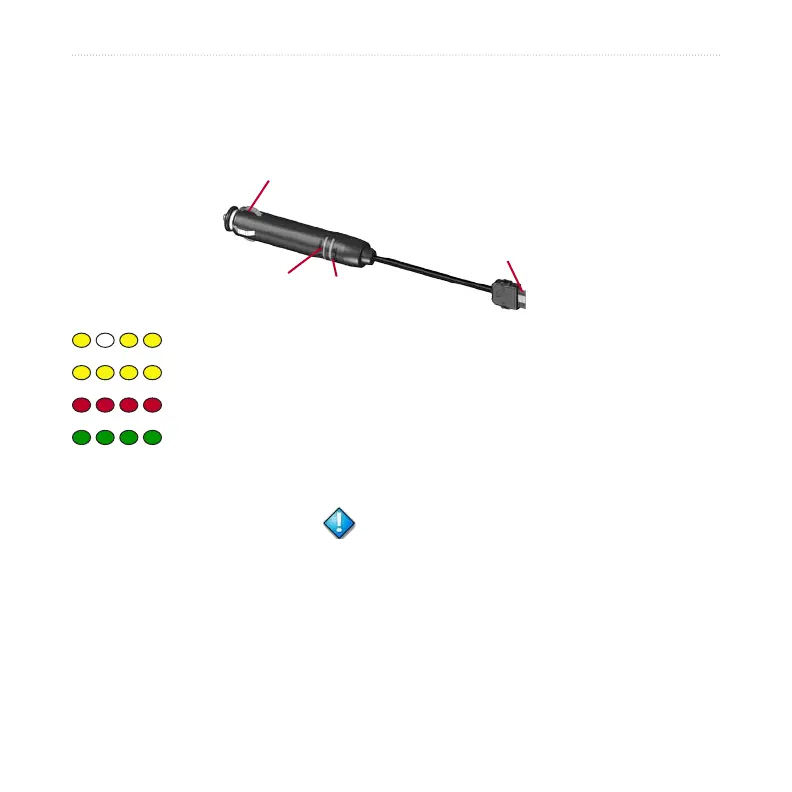
LED Blink Codes
The green Power LED lights when connected to external power. The Status LED
indicates the status of the traffic receiver.
To the power
connector on the nüvi
To the 12-Volt receptacle
in the vehicle
Power LED
Status LED
Yellow dot-dash flashes: determining which country you are currently in.
Yellow solid light: searching for signal.
Red solid light: momentary sync loss.
Green solid light: normal traffic data.
Viewing Traffic Incidents
1. On the Menu page, touch to display a list of traffic incidents.
2. Select an item to view details.
3. Select an option.


 To Next Page