BLUETOOTH
®
Connecting/Pairing to a weather/traffic/audio device via Blue-
tooth:
1)
Ensure the weather/traffic device is turned ON. From the Main Menu,
touch Tools > Setup > Bluetooth > On.
2)
Touch Not Paired or Not Connected next to the device. A Bluetooth
Passkey window will open.
3)
Touch OK. The weather/traffic device is now connected.
'EASY UPDATE' DATABASE DOWNLOADING AND
INSTALLATION (AUTOMATED AND USER-INITIATED)
Database purchases are available online (www.fly.garmin.com). However, once
the databases are purchased online, the ability to download and install databases is
available from the aera 660 via Wi-Fi.
Database downloads can be automatically downloaded as updates become
available, or be user-initiated.
Enabling automated database downloads:
1)
If Automatic Database Downloads are currently disabled, from the Main
Menu, touch Tools > Downloads.
2)
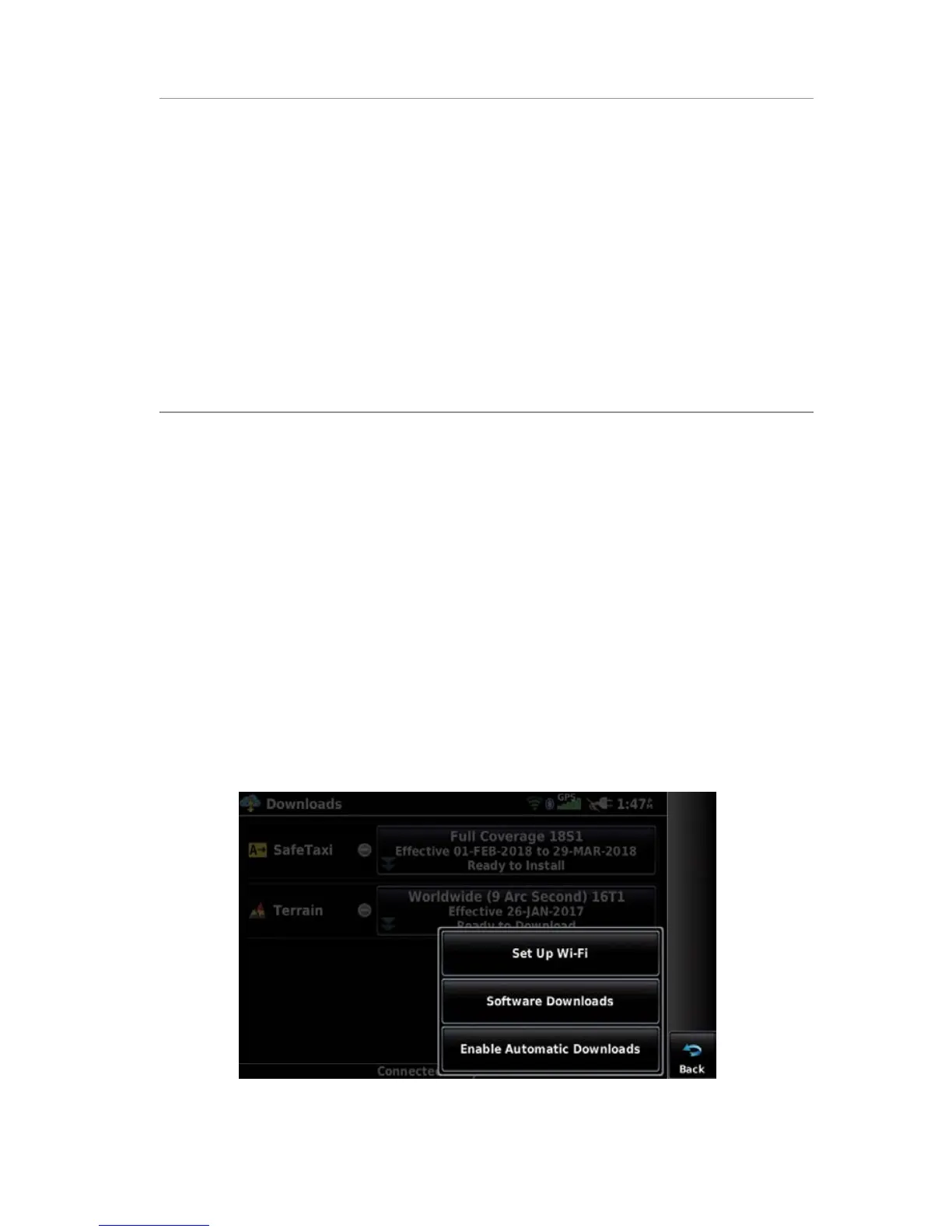
Touch Enable Automatic Downloads. This enables the unit to
automatically download databases as they become available. The user is
prompted when a database is ready for installation.
Enabling Automatic Downloads









 To Next Page