5
Menu Modes
Using Menu Mode
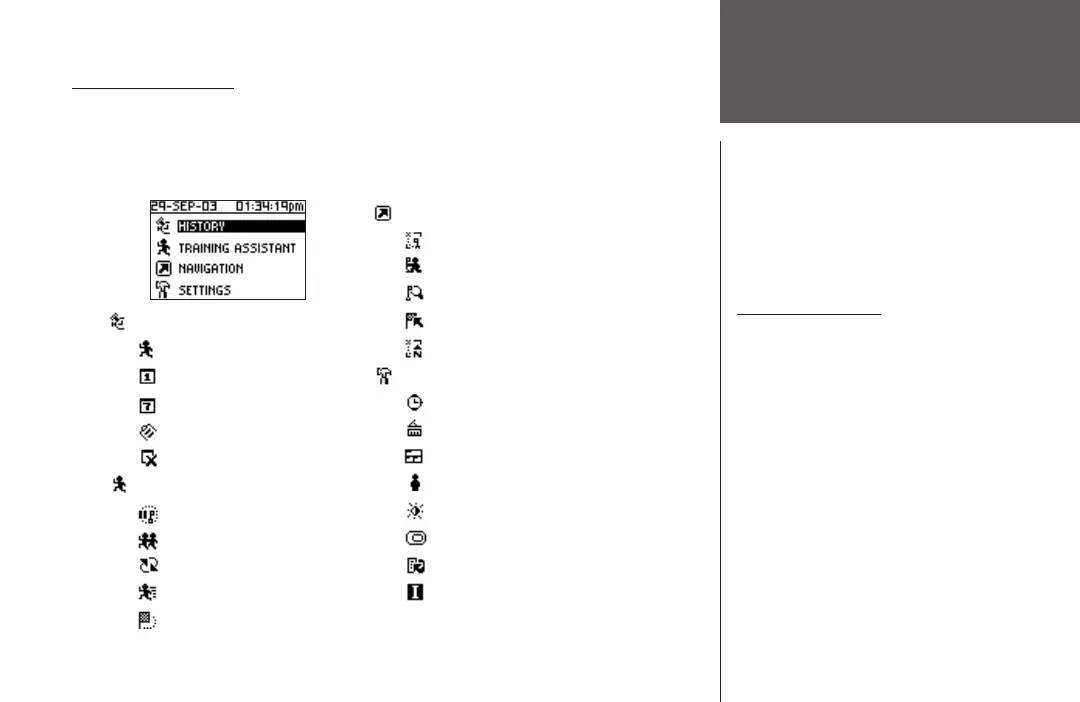
MENU NAVIGATION
Your Forerunner 101 allows you to navigate through menus quickly and efficiently using
a combination of the ENTER button, the UP and DOWN buttons, and the MODE button.
The diagram gives you a quick glance of all available options. To read more about a particular
menu option, turn to the page number indicated to the right in parentheses.
History (6-8)
Last Run (6)
By Day (6-7)
By Week (7)
History Totals (8)
Delete (8)
Training Assistant (9-16)
Auto Pause/Lap (9)
Virtual Partner (10-11)
Interval Training (12-13)
Pace (Speed) Alert (15)
Time/Dist(ance) Alert (16)
Navigation (17-24)
Add/Remove Map Mode (17)
Mark Location (18-20)
Find Location (20-22)
Back to Start (23)
Orient Map North/Ahead (23-24)
Settings (24-31)
Set Time (22-25)
Set Units (26-27)
Set Custom Page (27-28)
Set Profile (28)
Set Display (29)
Set System (30)
Restore Settings (31)
About Forerunner (31)
Using Menu Mode
The POWER Button:
• Press and release to turn the backlight
on and off
The MODE Button:
• Press to go to the next Main Mode
• Press to ‘undo’ the most recent action
The ENTER Button:
• Press to confirm data entry or menu
selection
The UP/DOWN buttons:
• Press to highlight the options on the
menu












 To Next Page