31
Menu Mode
Settings:
Restore Settings/
About Forerunner
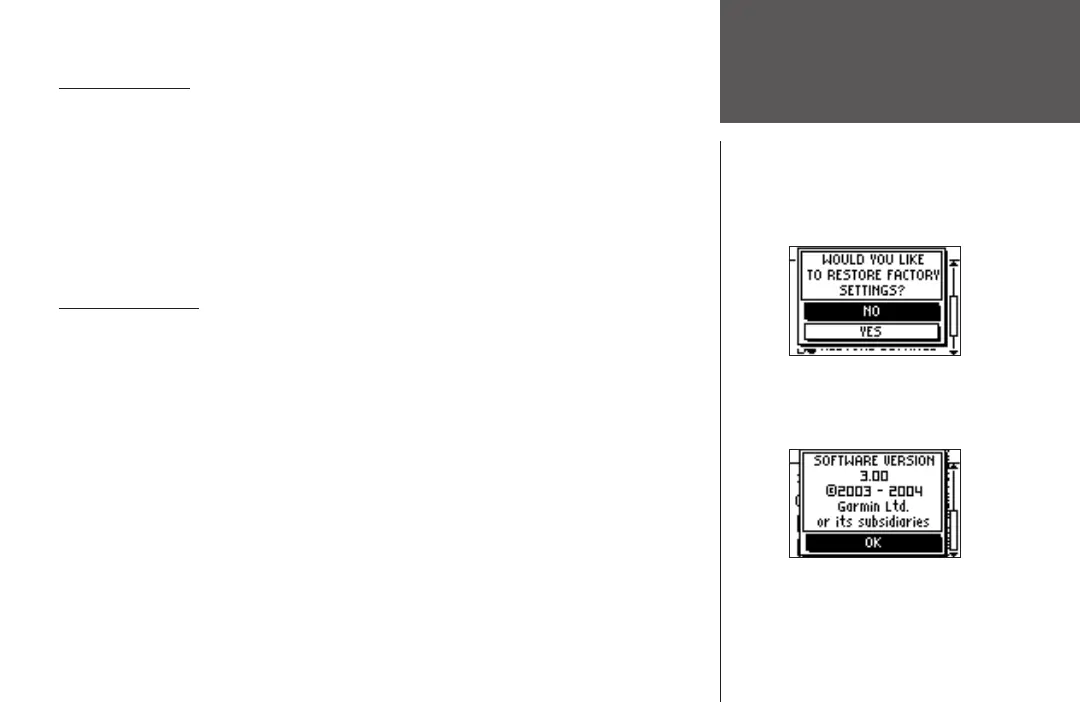
Restore Settings
This option allows you to restore the factory settings to options in the SETTINGS menu
ONLY. Data and settings in other menus, such as HISTORY and TRAINING ASSISTANT, are
not affected.
To restore factory settings:
1. From the Menu Mode press the DOWN or UP button to highlight ‘SETTINGS’. Press ENTER.
2. Press the DOWN
or UP button to highlight the ‘RESTORE SETTINGS’ field and press ENTER.
3. Press the DOWN or UP button to highlight your selection and press ENTER.
About Forerunner
Displays the software version of your Forerunner.
To view the software version:
1. From the Menu Mode press the DOWN or UP button to highlight ‘SETTINGS’. Press ENTER.
2. Press the DOWN
or UP button to highlight the ‘ABOUT FORERUNNER’ field and press
ENTER.












 To Next Page