8
Menu Mode
History:
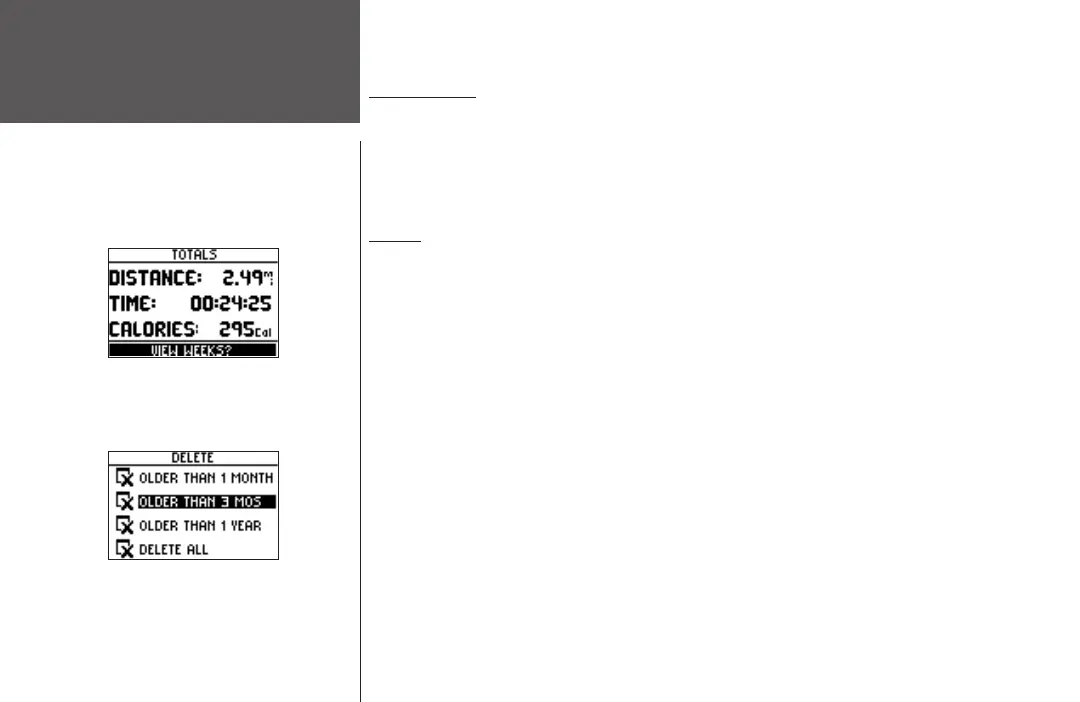
History Totals and Delete
History Totals
Selecting this option allows you to see an overview of your total workouts combined.
To view the History Totals mode:
1. With ‘HISTORY’ highlighted in the Menu Mode, press ENTER.
2. Highlight ‘HISTORY TOTALS’ and press
ENTER.
Delete
This option allows you to delete some or all of your workouts. You can delete ‘Older than
1 month’, ‘Older than 3 months’, ‘Older than 1 year’, or ‘Delete All’. Once you choose one of
the available options a window appears asking if you are sure you want to delete the lap or
workout.
To delete a workout record:
1. With ‘HISTORY’ highlighted in the Menu Mode, press the ENTER button.
2. Highlight ‘DELETE’ and press ENTER.
3. Press the DOWN
or UP button to highlight your period of workouts you want to delete.
4. Once highlighted, press ENTER. A message appears “DO YOU REALLY WANT TO DELETE
THESE LAPS?”. If you do, highlight ‘YES’ and press
ENTER. If you do not, highlight ‘NO’
and press ENTER.












 To Next Page