25
Menu Mode
Settings:
Set Time
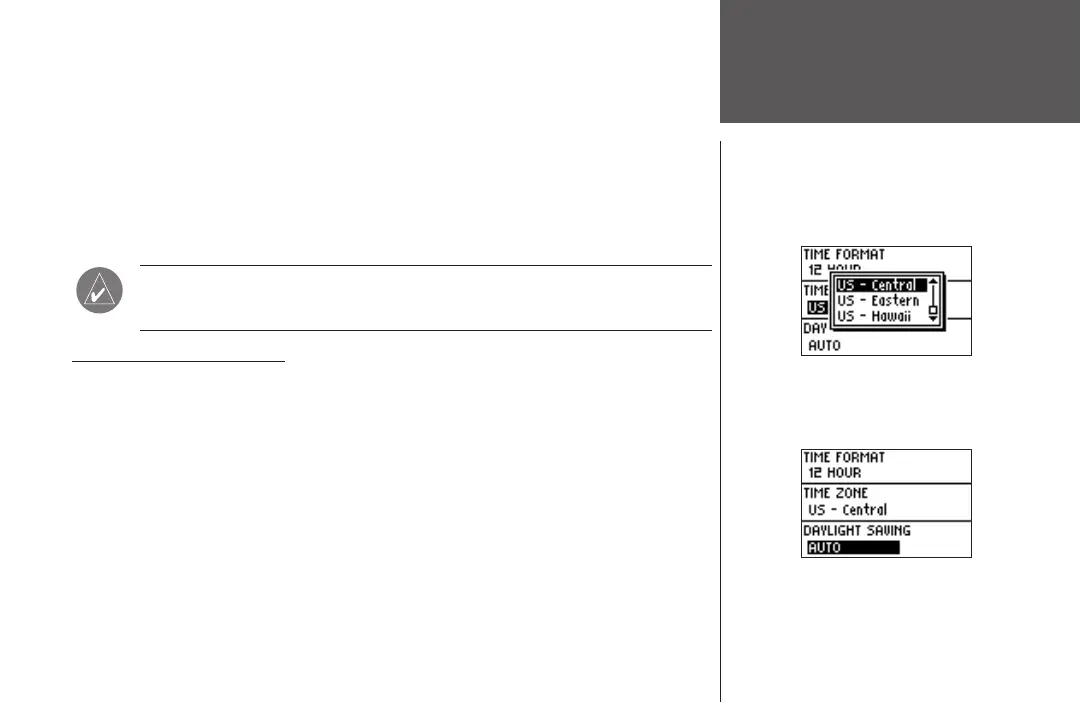
To change the Time Zone:
1. Highlight ‘SETTINGS’ in the Menu Mode and press ENTER.
2. Press the DOWN or UP button to highlight ‘SET TIME’. Press ENTER.
3. Press the DOWN
or UP button to highlight the ‘TIME ZONE’ field and press ENTER.
4. Press the DOWN or UP button to scroll through the selections. Press the ENTER button
when you have found the correct Time Zone.
5. Press the
MODE button to return to the mode of your choice.
NOTE. If you select ‘Other’ for the Time Zone choice, you must enter the UTC
offset for your location and the Daylight Savings time option is not available.
SET TIME: Daylight Savings
Daylight savings time can be set to ‘Automatic’, which automatically changes the clock
settings for daylight savings. You can choose ‘Yes’ to manually add daylight savings or ‘No’ to
remain on standard time.
To change the Daylight Savings Field:
1. Highlight ‘SETTINGS’ in the Menu Mode and press ENTER.
2. Press the DOWN or UP button to highlight ‘SET TIME’. Press ENTER.
3. Press the DOWN
or UP button to highlight the ‘DAYLIGHT SAVING’ field and press ENTER.
4. Press the DOWN
or UP button, highlight ‘AUTO’, ‘YES’, or ‘NO’ and press ENTER. Press the
MODE button to return to the mode of your choice.












 To Next Page