6 Forerunner
®
301 Owner’s Manual
GETTING STARTED > BUTTONS
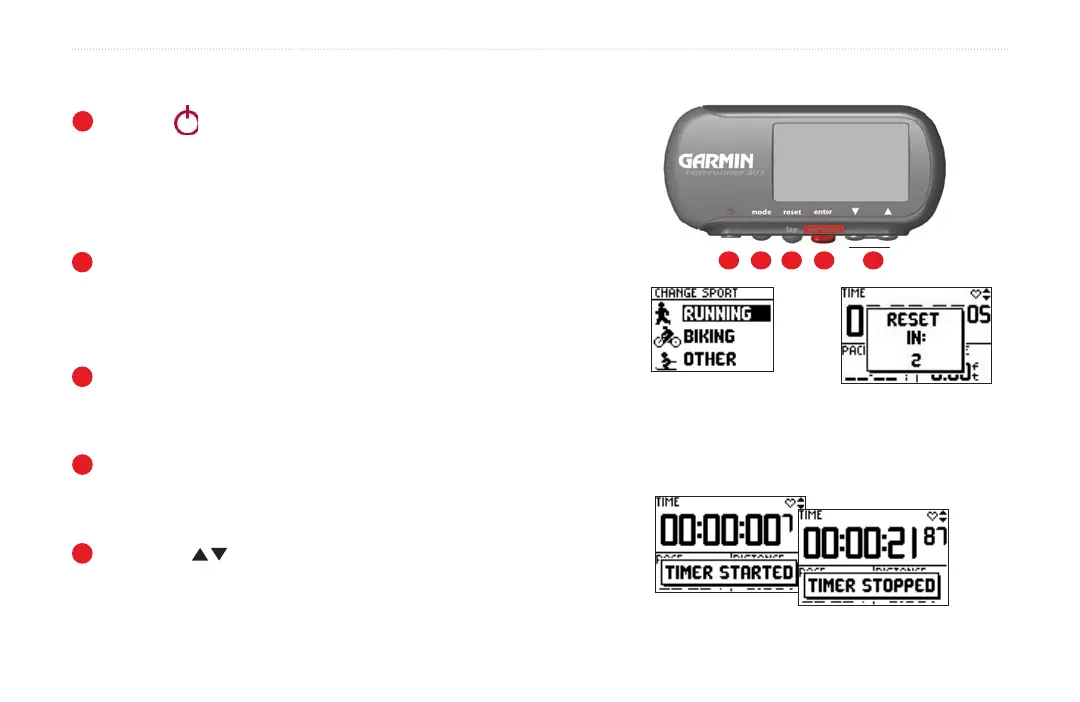
Buttons
1
Power
• Press and hold to turn unit on/off.
• Press to turn backlight on/off.
• Press Power while pressing and holding the reset
button to reset the unit if it freezes.
2
mode
• Press to switch between Timer and Menu modes.
• Press and hold to change sports.
• Press to acknowledge messages.
3
reset/lap
• Press and hold to reset the timer.
• Press to create new lap when timer is started or stopped.
4
enter/start/stop
• Press to select options.
• Press to start/stop the timer.
5
up/down
• Press to highlight options.
• Press to scroll through data pages.
Front View
1 2 3 4 5
Press and hold mode to change
to a different sport.
Press and hold reset to
reset the timer.
Press start/stop to control the timer.
Be sure to reset the timer before each new workout,
unless you are doing a MultiSport workout (see page 23).


 To Next Page