Forerunner
®
301 Owner’s Manual 23
WORKOUTS > MULTISPORT WORKOUTS
MultiSport Workouts
Triathletes, duathletes, and other multisport competitors can
take advantage of the Forerunner’s MultiSport workouts.
When you set up a MultiSport workout, you can switch
between sport modes and still view your total time and
distance for all sports. For example, you can switch from
Biking mode to Running mode and view your total time and
distance for biking and running throughout your workout.
The Forerunner stores the MultiSport workout in History
and includes total time, distance, average heart rate, and
calories for all sports in the workout. For more information,
see “Viewing Workout History.”
You can create and use MultiSport workouts manually, or
you can preset MultiSport workouts for races and other
events.
Using MultiSport Manually
You can create a manual MultiSport workout by changing
sport modes during your workout without resetting the
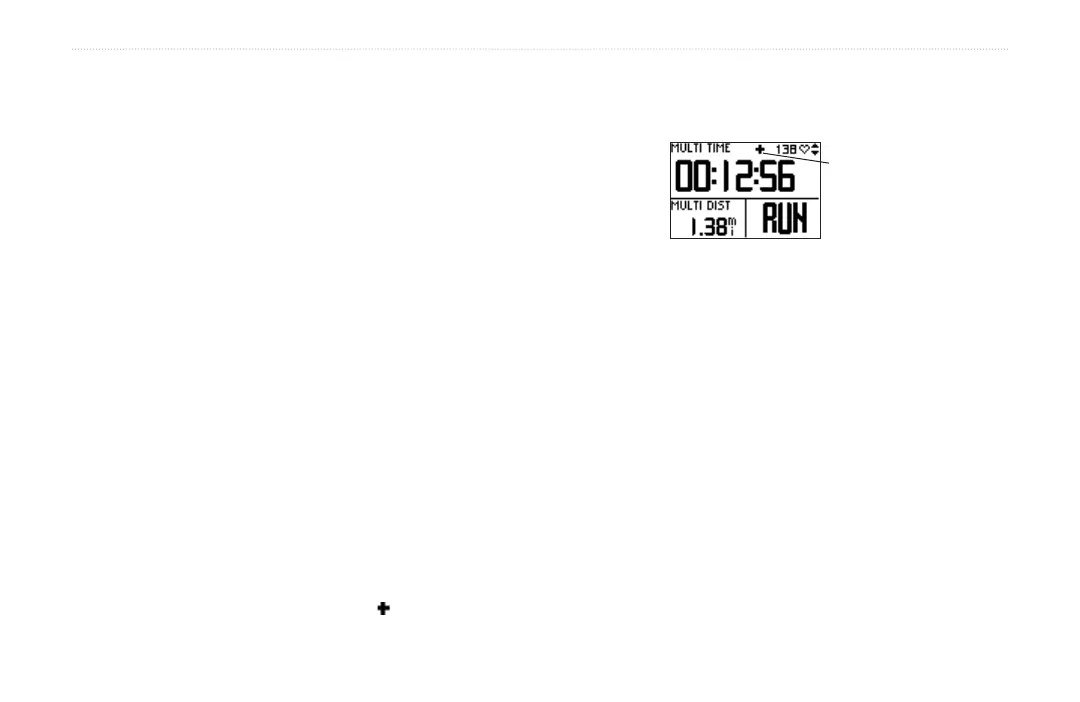
timer. When you change sport modes, a MultiSport icon
appears on each page in Timer mode, and a MultiSport
timer page is added to the Timer page loop.
MultiSport Timer Page
MultiSport icon
To create a MultiSport workout manually:
1. Start and complete a workout in any sport. Press
stop to finish your workout, but do not reset the
timer.
2. Press and hold mode until the Change Sport menu
appears.
3. Select another sport and press enter. The MultiSport
icon appears, and a new MultiSport timer page
appears in the page loop.
4. Press start to begin your workout in the new sport.


 To Next Page