Forerunner
®
301 Owner’s Manual 25
VIEWING WORKOUT HISTORY
VIEWING WORKOUT HISTORY
Your Forerunner automatically saves all workout data (when
the timer is started) and can hold up to two years (5000
laps) of data in memory. The Forerunner never erases old
workout history, so you will never lose data. Instead, it stops
recording history when it becomes full. Load your history
into the Garmin Training Center software periodically to
keep track of all of your workouts.
Workout history data includes distance, time, calories, heart
rate, and detailed lap information. No data is saved when
the timer is stopped.
History on the Forerunner is organized by sport. To view
history for a certain sport, you must change to that sport
mode. You can view the data on your Forerunner or transfer
the data to the Garmin Training Center software, where you
can analyze your workout.
To
view history by day:
1. Press mode to access Menu mode. Then select Run
History (Bike History or Other History).
2. Highlight
By Day and press enter.
3. Press to scroll through the list of workouts. As you
scroll, summary details appear below the workout list
for each workout.
4. Highlight a workout and press enter to view all
workout details.
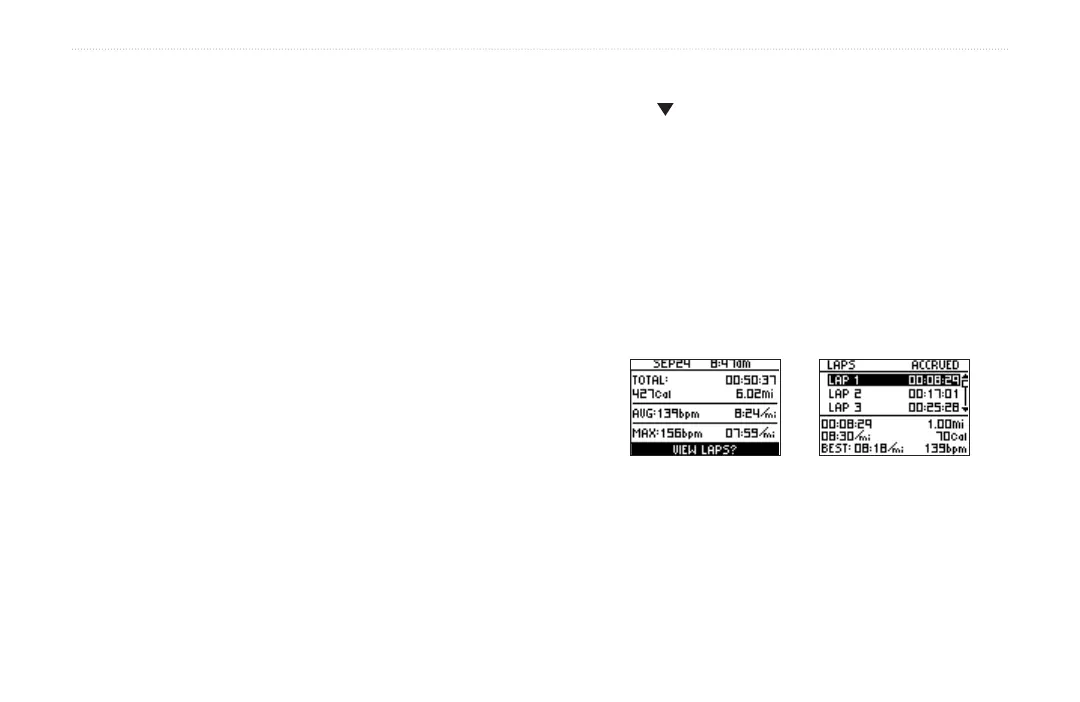
The Forerunner displays the details of a workout differently,
depending on the type of workout you did. Details of a basic
workout appear on one summary page. To view lap details,
highlight View Laps and press enter.
Highlight each lap to view
detailed information at the
bottom of the page.
Basic workout history


 To Next Page