44 Forerunner
®
301 Owner’s Manual
CUSTOMIZING > SETTING HEART RATE ZONES
your workout. The Forerunner saves data from
each workout and combines it with data from other
workouts until it can calculate your heart rate zones.
• Your lactate threshold will move no more than 3
bpm at a time. It takes the Forerunner at least four or
five workouts to adjust to a different runner, so don’t
worry if you let someone else borrow it.
• If you turn off AutoLearn and then turn it back on in
the future, the Forerunner restores all old AutoLearn
data automatically.
For more information about heart rate zones and AutoLearn,
see “Training with Heart Rate Zones” in the Appendix.
NOTE: Currently, AutoLearn works only in Running
mode. Heart Rate zones for Biking mode and Other
mode are based on your maximum heart rate.
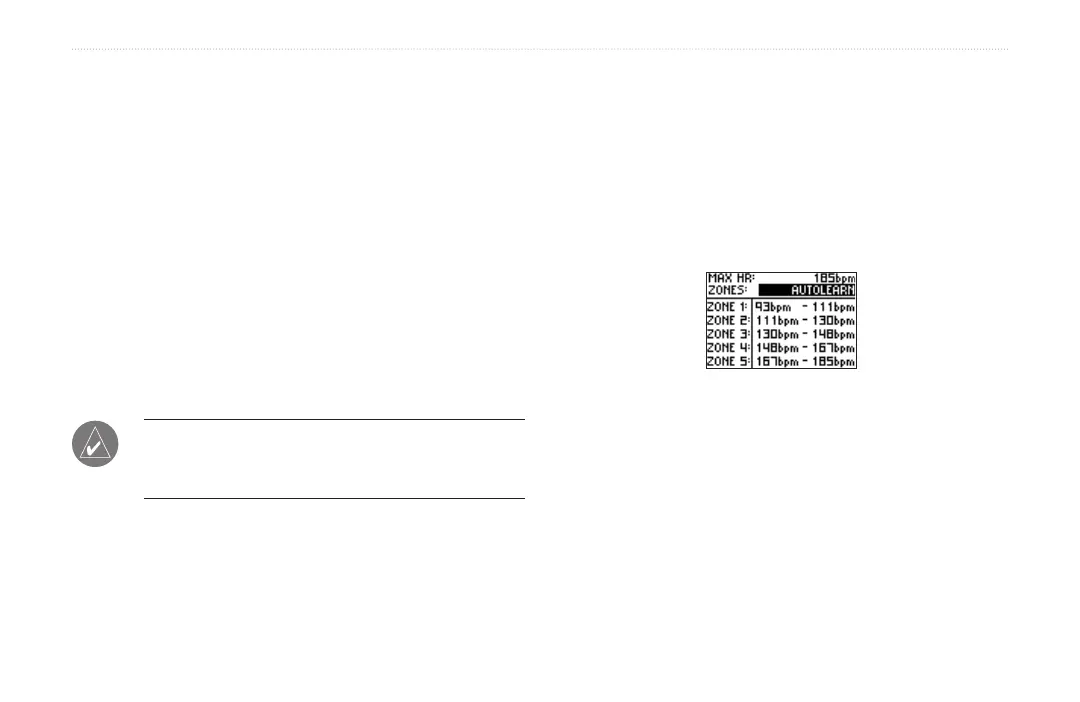
To turn on AutoLearn:
1. Press mode to access Menu mode. Then highlight
Settings and press enter.
2. Highlight Running and press enter.
3. Highlight Set HR Zones and press enter.
4. Highlight the Zones field and press enter. Then
select AutoLearn.
AutoLearn only works for Running
mode, not for Biking or Other modes.


 To Next Page