20
Main Pages
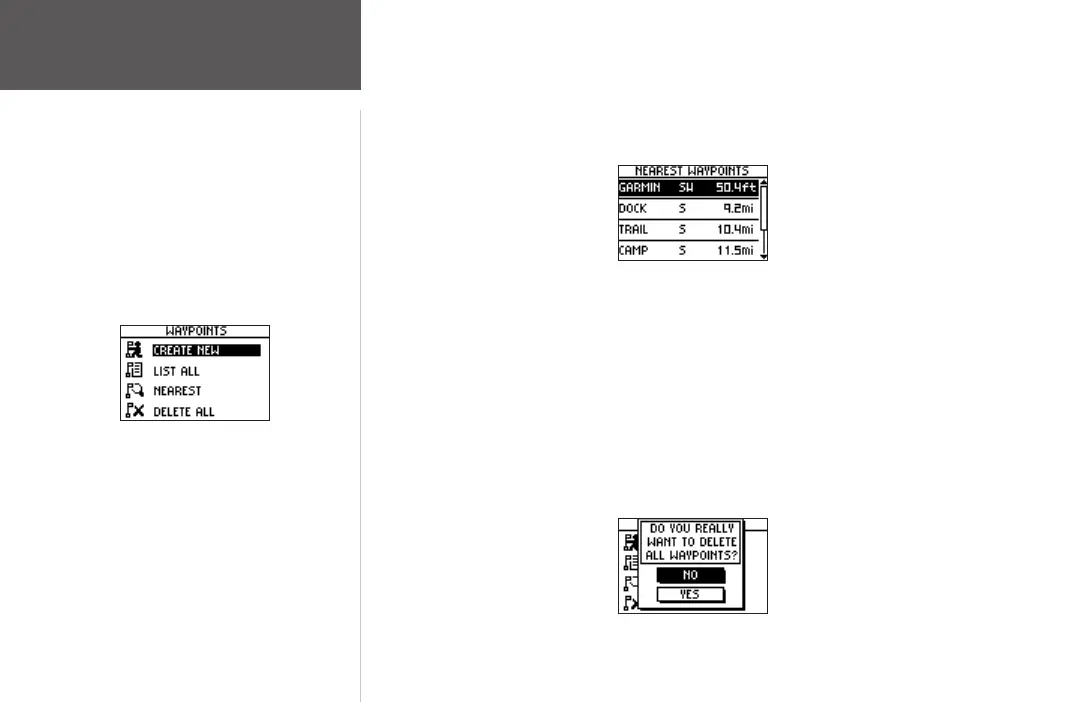
To view the nearest waypoints page:
1. From the Main Menu Page press the UP or DOWN button to highlight ‘WAYPOINTS’,
then press the ENTER button.
2. Select ‘NEAREST’ and press the
ENTER button to see a listing of the nine closest
waypoints by name and distance from your location.
Nearest Waypoints Page
3. Press the UP or DOWN button to select the waypoint and press the ENTER button to
display the Review Waypoint Page.
To delete all waypoints:
1. From the Main Menu Page press the UP or DOWN button to highlight ‘WAYPOINTS’,
then press the ENTER button.
2. Select ‘DELETE ALL’ and press the
ENTER button.
3. A confirmation message box displays asking if you really want to delete all waypoints.
Press the UP or DOWN button to highlight the correct choice and press the ENTER
button to complete the action.
Delete All Waypoints
Waypoints Menu Page
Waypoints Menu













 To Next Page