37
Main Pages
Route Setup
You may alter the way your Foretrex follows routes.
To access Route Setup:
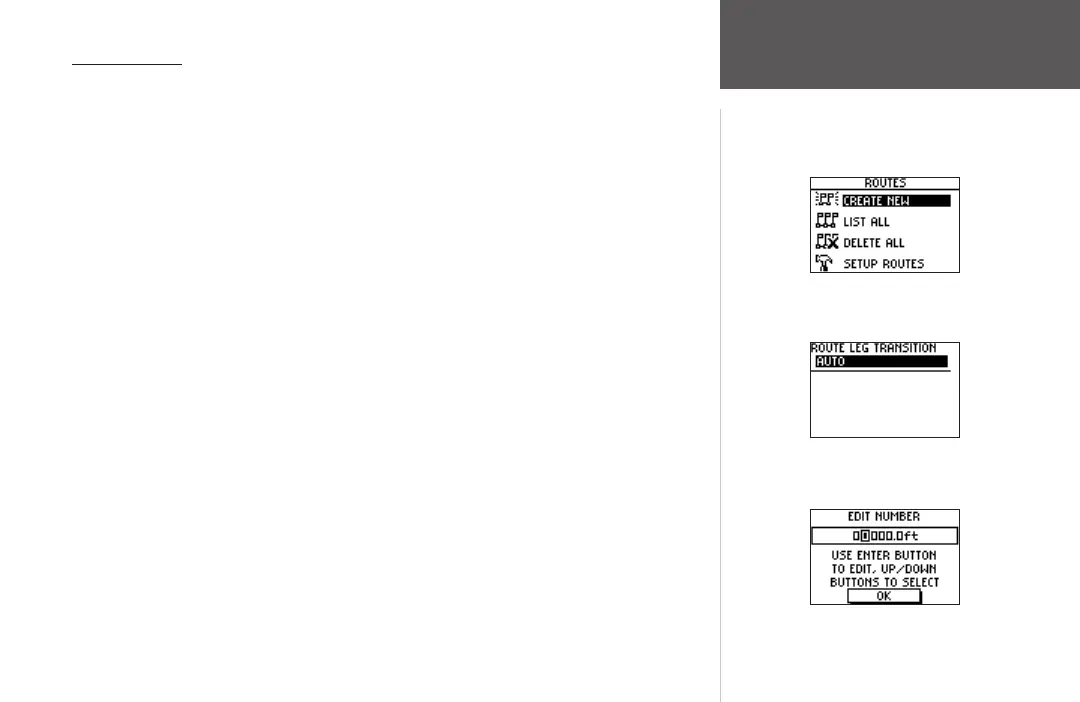
1. From the Main Menu Page, use the UP and DOWN buttons to highlight ‘ROUTES’.
2. Press the
ENTER button to access the Routes Menu Page.
3. Use the
UP and DOWN buttons to highlight ‘Setup Routes’ and press ENTER.
Route Setup Options
Route Leg Transition: Select a method to start guiding you to the next leg of the route.
Select ‘AUTO’ for the unit to automatically start guiding you to the next leg. Select ‘DIS-
TANCE’ to enter a specific distance to start guiding you to the next waypoint. This option is
especially helpful for people on hang gliders, sail boats, or other forms of transportation that
require more advanced warning of the next leg than normal.
Distance: Press ENTER to enter a specific number of feet from the next waypoint for the
Foretrex 201 to begin guiding you to that waypoint. For example, if you enter 1000 feet,
the Foretrex 201 will begin guiding you to the next waypoint (the next leg of the route)
when you are within a 1000 feet radius of that point.
Routes Menu Page
Routes Menu Page
Routes Setup
Edit Number Page













 To Next Page